Contents — find the section you need
Conversations with a large language model, and search itself, run entirely at home rather than depending on an external cloud API. Here's how the core of that — Ollama, Open WebUI, and SearXNG — is set up.
 Ollama
 SearXNG
Image: Ollama / SearXNG logos, Wikimedia Commons


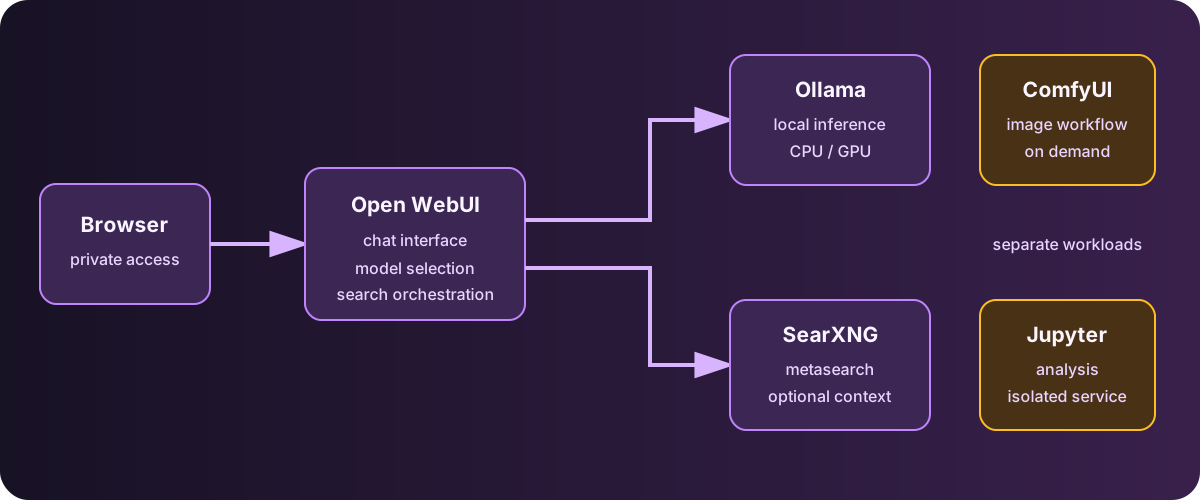
Diagram: Duskcoil. The regular chat path is separated from independent GPU-heavy and analytical workloads.
Ollama: A Local LLM Runtime
Ollama is a runtime for downloading and running large language models locally. To keep direct GPU access simple, it's installed natively on Windows rather than inside a Docker container — that avoids the added complexity of GPU passthrough through a container and lets it use the GPU at full strength. qwen3.5:9b handles general-purpose conversation, and dolphin-llama3:8b is kept around for less-filtered use cases.
There used to be several separate models running in parallel, each specialized for a different use case (one for analysis, one for accounting, and so on). Deciding the management overhead wasn't worth what little benefit the specialization actually bought, that got consolidated down to general-purpose models. The uncensored model, dolphin-llama3:8b, runs with the system prompt its developers recommend, used as-is.
Open WebUI: A Chat Front End
Open WebUI is a web-based chat interface for Ollama, with a feel close to a commercial service like ChatGPT. The setup is simple — pointing OLLAMA_BASE_URL at Ollama's API endpoint is all it takes to connect.
Tracking Down Why Responses Were Slow
Early on, a single turn could take close to ten minutes to respond. The cause turned out to be layered: (1) the general-purpose model, by default, ran a "thinking" pass spanning several thousand tokens before answering anything, and (2) on top of that, Open WebUI was firing off several additional, separate LLM calls of its own — for title generation, tagging, suggesting follow-up questions, and auto-rewriting image-generation prompts — none of which were the actual response. The fix: disable thinking mode, cap the number of generated tokens to stop runaway long-form generation, and individually turn off each of those auxiliary LLM-call features. These settings were written directly into the model's parameter table, so they don't need to be re-applied for every new chat.
A second issue: tool calling (triggering image generation, for instance) didn't work correctly with every model. Some models don't support Ollama's native tool-calling format, or support it unreliably, and tools simply fail to fire mid-chat. This too got a permanent fix by baking a setting into the affected model's default parameters that forces it to use the older, more broadly compatible tool-calling format instead. No more manually switching the calling mode chat by chat.
SearXNG: A Private Search Engine
SearXNG is a metasearch engine that aggregates results from multiple search engines rather than sending a query directly to any single search provider. Since it's run as a single-user instance for personal use, the bot-detection and rate-limiting features meant for public instances are disabled (those features exist for public instances shared by many anonymous users, and in a single-user, tailnet-only setup they're both unnecessary and a source of false positives).
Worth noting: this version of SearXNG uses Granian for its internal web server instead of the older uWSGI, and the environment variable that actually controls the listening port differs from what the uWSGI-era documentation describes — it's GRANIAN_PORT, not SEARXNG_PORT — a discrepancy from the documentation that took some care to work around. Digging into why the bot detection kept misfiring turned up a structural reason, too: SearXNG is reached over a TLS-termination-only, raw-TCP-forwarding path that bypasses the reverse proxy entirely, so the client-identifying headers a reverse proxy would normally attach simply don't exist on this path. Running that traffic through bot-detection logic built for a public instance means even completely legitimate access gets flagged as anomalous. Given the single-user, tailnet-only premise, the call was to disable the detection logic outright rather than try to work around the missing headers.
ComfyUI: Image Generation, Started Only When Needed
ComfyUI is set up with GPU passthrough for image generation, but unlike the other services it isn't kept running all the time. Its container's restart policy is set to "don't restart automatically," and it's started by hand only when actually in use. GPU workloads carry a real cost in memory and power, and there's little need to keep this one idling in the background — so manual startup is a deliberate choice here (the incident behind that decision is covered in the compute-foundation article).
A Dependency Trap Hit During Setup
The version of PyTorch bundled in the image used to set this up didn't support a new dependency component required by the latest ComfyUI release, and it errored out on startup. The fix was to manually upgrade PyTorch inside the container to a newer version.
Along the way, another problem surfaced: under the bridged networking mode, downloading the large GPU-related packages kept failing intermittently. Switching to the mode that shares the host's network directly resolved it — which, as a side effect, brought this service in line with the same networking mode used by the other always-on services.
On top of that, a crash caused by old and new versions of the cuDNN library coexisting also turned up. That one got fixed by explicitly overriding the library search path via the container's environment variables, so the newer version takes priority. The dependencies were tangled across several layers at once — the image's base PyTorch, the application itself, and individual libraries — and each had to be isolated and diagnosed one at a time.
Integration with Open WebUI
Pointing Open WebUI's own image-generation feature at ComfyUI as its backend makes it possible to type a prompt directly into the chat screen and generate an image. The workflow used for generation itself — the node graph, including the sampler type, step count, and default negative prompt — was set up by writing it directly into Open WebUI's internal database. Turning on image generation from the chat input's tool menu and sending a message is all it takes; ComfyUI's workflow gets invoked behind the scenes.
Jupyter Notebook: A Local Compute and Analysis Environment
For interactive data processing and analysis, Jupyter Notebook also runs in a container using the host's resources. It starts as root with automatic home-directory ownership adjustment enabled, and mounts a host-side working directory directly as the notebook's workspace. Browser bookmark data is also mounted in read-only, making the environment handy for small personal analysis and organizing tasks built around bookmark data too.
How the Permissions Got Cut Back
Getting to the current setup took a round of scaling permissions back. Originally, this ran not just as root but with passwordless sudo enabled on top of that, and with the browser's actual profile directory — cookies, saved passwords, all of it — mounted in its entirety. That was a choice made purely for the convenience of analysis tasks. A later audit turned up that, on top of all that, the service had been left exposed on every interface rather than loopback-only — the two problems compounding each other. The fix: bind it to loopback, drop the unconditional sudo grant, and cut the mount target down from the entire browser profile to a single bookmarks file. The auth token, too, which had been written directly into the container definition, got split out into its own separate file. It's a textbook case of "it's just for me" complacency, in an analysis environment, quietly stacking up one excessive permission after another.
Does GPU availability make latency depend only on the model?
Memory, loading, contention, and input length also matter. Measure latency under actual concurrent workloads.
Comments
Please log in to post a comment
No comments yet.