Contents — find the section you need
Rather than scattering appliance control across every manufacturer's own cloud, it's all consolidated onto a single self-hosted platform. Home Assistant is the core, tying together sensors and an external voice assistant through an MQTT broker (Mosquitto).
 Home Assistant
Image: Home Assistant logo, Wikimedia Commons (CC BY-SA 4.0)

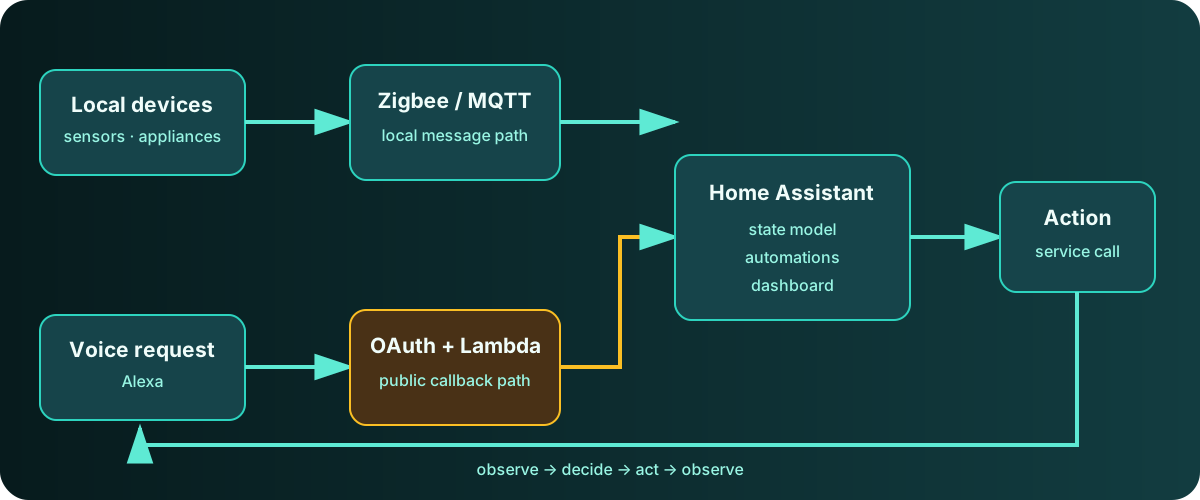
Diagram: Duskcoil. Local control and the external voice-integration path are shown separately.
Home Assistant: Where Appliance Control Converges
Home Assistant is an open-source home-automation platform with an enormous number of supported devices. The air conditioner and lighting are brought in via Nature Remo (an infrared appliance controller). Nature Remo's standard integration was removed from Home Assistant core, so it was installed through HACS (a package manager for community-built custom integrations) instead.
Right after bringing it in, temperature settings started being sent in Fahrenheit, and the air conditioner's API kept returning errors. The cause was that Home Assistant's global unit system was set to the US convention — a setting independent of the country/language settings, and easy to overlook for exactly that reason. Switching the unit system to metric fixed it. Since then, the Nature Remo integration has had a handful of DNS resolution timeouts in short succession, but each one recovered on its own; it's being watched, not acted on, since there's been no real-world impact.
MQTT: Mosquitto
Mosquitto is an MQTT broker independent of Home Assistant itself, introduced with an eye toward future Zigbee sensor integration (via Zigbee2MQTT). Home Assistant connects to it through its own MQTT integration, and can treat any sensor value received over MQTT as an entity.
Where Zigbee Integration Stands
The service definition for Zigbee2MQTT, which handles Zigbee devices, is already in place, with its dependency on Mosquitto already configured — but it isn't enabled yet, pending the arrival of a Zigbee USB dongle. A comment is already left in place describing the steps for once the dongle arrives: check the device path (/dev/ttyUSB* or similar), then adjust the container's device passthrough and Zigbee2MQTT's serial port setting to match the actual hardware before starting it. Getting the software side wired up ahead of having the hardware in hand means that once the dongle arrives, starting the integration will take nothing more than a few lines of config changes.
The integration approach chosen is Zigbee2MQTT paired with MQTT, rather than the other common Zigbee stack (ZHA). The reasoning: broader device compatibility, plus the extensibility of letting tools other than Home Assistant pull sensor values straight off MQTT. While getting the software side ready, one more gap turned up in the USB-passthrough plumbing into the virtualized environment (WSL2) itself: the Windows-side USB/IP client was already installed, but WSL2 had no matching client command by default, and the relevant package doesn't even exist in the standard repository — it needs to come in through a different package entirely. It's installed now, and the command itself has been confirmed working — but had this gone unnoticed until the dongle actually arrived, the attach step on the Windows side would have appeared to succeed while the device simply never showed up on the WSL2 side, a failure mode that's genuinely hard to diagnose after the fact. That's part of the value of wiring up the software side before the hardware arrives: it front-loads exactly the kind of gap you'd otherwise only discover once you actually try plugging something in.
Voice Integration with Alexa: OAuth and AWS Lambda
Rather than using the manufacturer's own cloud integration, voice-assistant integration runs through a custom skill on AWS Lambda that connects to Home Assistant. That keeps the logic for handling voice commands under direct control. The AWS account is a regular, classic personal account created for this purpose — a lightweight sandbox-style account was considered too, but its region restrictions were too tight for Lambda region selection, so that was abandoned. The Lambda function runs on the Python 3.14 runtime, with an execution role limited to an AWS-managed policy granting only basic execution permissions.
The linchpin of the integration is OAuth-based account linking. That authorization flow involves three distinct communication paths, each with its own constraints.
- The login screen (via browser): works on any port
- Authorization code issuance: happens through a browser redirect
- Token exchange (server-to-server): called directly from the voice assistant's own backend
The third path — the token endpoint — turned out to have a constraint: it won't allow communication on anything but the standard HTTPS port (443). The login screen itself works fine on a non-standard port, which makes the cause hard to isolate. It never reproduces through manual browser access — it only fails on the automated server-to-server call. The setup originally used a non-standard port: the login screen succeeded every time, yet the token-exchange endpoint was never once called, and account linking kept failing with a generic "can't link your account" message. Switching to the standard port fixed it immediately. Anyone integrating a self-hosted platform with an external voice assistant's OAuth flow should design around this constraint from the start.
There's a second, separate technical trap around the voice assistant app's official server-side feature (WebSocket) when running against Home Assistant. Tailscale's Funnel (public exposure) advertises HTTP/2 via ALPN by default, but neither Home Assistant's aiohttp server nor Immich's Socket.IO support the WebSocket upgrade over HTTP/2 (RFC 8441), so a real-time connection can never be established. Normal page browsing works fine over HTTP/2, which makes this easy to miss. The fix is to configure Funnel/Serve in "TLS-termination-only, raw TCP forwarding" mode instead of HTTPS-proxy mode, so HTTP/2 is never advertised via ALPN in the first place. The response codes on actual HTTP requests confirmed the WebSocket upgrade was going through correctly, but that fix alone didn't fully resolve connection trouble on the official phone app by itself. Since browser-based access stayed rock solid the whole time, this doesn't look like a pure network-reachability issue — more likely something rooted in the app's own stored server registration — so the workaround for now is simply using the browser instead.
On top of that, something else unexpected happened during this same round of port fixes. While correcting the port settings, the tunnel configuration for a media server (Jellyfin) that had been publishing fine under a different, unrelated setting got accidentally overwritten, temporarily knocking it offline from outside. The cause: the tunnel's external-facing listener and the media server's own listen port ended up colliding, producing a TLS-handshake-level error. The fix was to deliberately separate the externally exposed port number from the internally bound port number — the same "external/internal port split" pattern used across the rest of the self-hosted fleet. That experience turned into a habit: after changing one service's configuration, cross-check whether it rippled into another service's exposure settings.
A Separate Trap: Migrating Home Assistant's Settings
Home Assistant's http component configuration has a known trap where changes made through YAML silently stop taking effect. In some versions, the http component's settings get migrated once, on first boot, into internal persistent storage — and from that point on, no matter how much the http: block in configuration.yaml gets edited, it's simply ignored. If access through a reverse proxy starts throwing an error to the effect of "the reverse proxy isn't configured correctly," the cause usually isn't a mistake in the YAML — it's that this one-time migration flag is preventing the change from ever taking effect. Recovering from it means editing the internal persistent storage file directly (a dated backup is taken before touching it). The lesson: when a documented config change refuses to take effect, the first thing to question is whether that setting is actually still being read from YAML at all.
During debugging, a temporary logging hook was also added directly into Home Assistant's own core auth-related files to trace the flow of the exchange. Once the cause was identified, the original files were restored.
Writing Code on the Voice Assistant Side
The in-browser code editor built into the voice assistant's developer console repeatedly corrupted syntax by non-deterministically dropping characters when code was pasted directly into it. Tracking down the actual cause was abandoned; the fix was to write the file locally, zip it, and upload it as a bundle instead.
Unresolved: One Device's Integration Keeps Failing
The standard integration for a robot vacuum (Ecovacs) fails authentication every time with Device verification required (error code 1013) when adding the account. The investigation initially suspected a local configuration problem, but checking the container's logs over the prior 24 hours turned up the same error 12 separate times. Searching GitHub for that exact error surfaced multiple reports of the identical issue across both the integration library's own repository and Home Assistant core's, all of them still open.
Root cause: the device manufacturer changed their cloud API to newly require email-based device verification, and the integration library caught up by implementing the verification flow itself. But the underlying upstream bug is that even when verification itself succeeds, an internal re-login kicks off immediately afterward — and that re-login re-triggers the very same verification requirement, failing the whole setup. Since this isn't a problem with local configuration or account credentials, reconfiguring or logging in again doesn't fix anything.
Current approach: since the manufacturer's own voice-assistant skill integration still works fine for day-to-day operation, this isn't a priority right now — it's being watched, not acted on. The plan is to periodically check on the state of the upstream issues and retry the integration once the library ships a fix. There's real value in explicitly deciding to wait on an upstream fix once everything on the local side has been exhausted, rather than leaving it in limbo.
Does a voice response prove the appliance changed state?
Check authentication, delivery, and device state separately. Accepting a request is different from executing it.
Comments
Please log in to post a comment
No comments yet.