Contents — find the section you need
Every service in this project runs on a single Windows PC. Not a dedicated server box — it borrows compute from a PC used for everyday work. Here's how that runtime is put together.
 Docker
Image: Docker logo, Wikimedia Commons

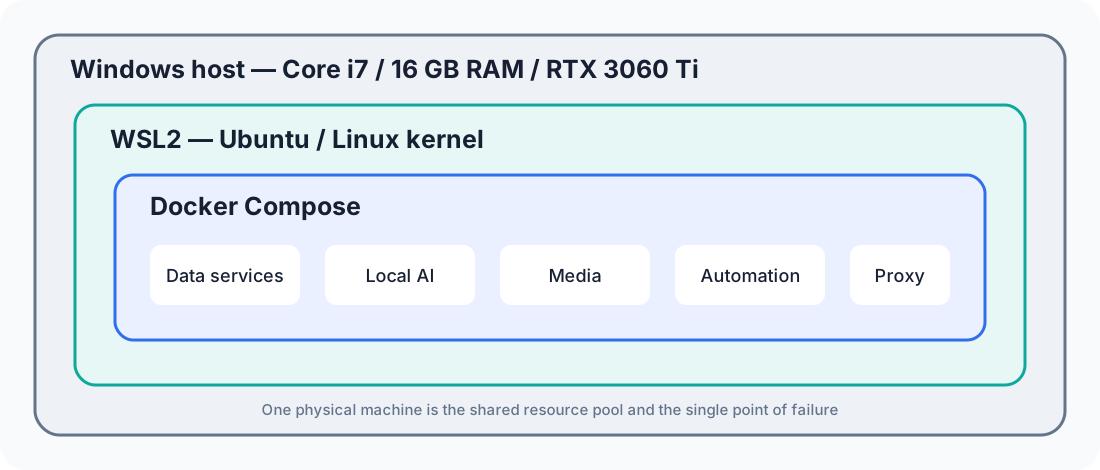
Diagram: Duskcoil. OS, virtualization, and container layers share the memory and GPU of one physical PC.
Runtime: Docker on WSL2
Each service runs as a Docker (Docker Compose) container, on top of Ubuntu running under Windows Subsystem for Linux 2 (WSL2). Because WSL2 actually runs the Linux kernel inside a virtual machine, Docker Engine behaves the same way it would on a native Linux host. WSL and the Docker service are set to start automatically when Windows boots, so the whole fleet comes up just by powering on the PC.
Hardware: Compute Resources, GPU Included
The physical compute is a single desktop PC (an Intel Core i7-12700, 10 cores/20 threads), and having a GPU in it (an NVIDIA GeForce RTX 3060 Ti) is what makes both local AI and hardware-accelerated media transcoding possible. GPU, CPU, and disk space all currently have plenty of headroom — the real bottleneck is memory. Physical memory is 16GB, and the memory ceiling allocated to WSL2 is shared with another project running in parallel on the same machine (a workspace for robot development), so it's deliberately not changed purely to suit the server side. Bumping memory up to 32GB is the leading candidate for a hardware upgrade, but hasn't happened yet, weighing cost against benefit.
Sharing One GPU Across Multiple Services
The GPU on this PC is shared across several workloads with very different characteristics: Jellyfin's video transcoding, ComfyUI's image generation, Immich's machine-learning inference (face recognition, subject detection), and local LLM inference via Ollama. Some of these run all the time; others are started manually only when needed, and that choice of when to start what is itself an operational trick for effectively multiplexing a limited amount of GPU memory. Each service that touches the GPU directly is given explicit access to the GPU device (the gpu, compute, and video capabilities) through its container's resource-reservation settings.
What a Memory-Pressure Incident Taught Me
Memory being the bottleneck surfaced as an actual incident, not just a theoretical concern. The monitoring dashboard fired a critical alert for swap usage north of 98%. Investigating, the cause turned out to be the image-generation service (ComfyUI) holding onto a large chunk of memory (over 40% of everything allocated to WSL2) even while idle, with no image generation actually happening.
At the time, individual per-container memory limits weren't yet a thing. With one container free to claim memory without any ceiling, that one container's behavior could drag every other container down with it. The fix: switch ComfyUI's restart policy from "always on" to "don't restart automatically," and start it manually only when actually needed. That took its idle memory footprint to zero. A handful of old, essentially unused services (a whole toolchain for automated video acquisition) were also removed at the same time, and both memory usage and swap usage improved substantially as a result.
That incident fed directly into a later, broader evaluation-and-improvement pass across the whole server: every running container (roughly twenty across the main service fleet and the photo-management stack) got an explicit memory limit, with no exceptions. The rule was "generous limits for services that spike memory momentarily, smaller ones for lightweight always-on services" — sized to each service's actual load. It's a lesson learned after the fact: put a ceiling on each container individually before one service's unexpected behavior can take down everything else.
Version Control: A Foundation That Got Put Off Too Long
As the number of services grew, it became increasingly unclear exactly what had been changed in each service's definition file or individual config file, or how to get back to a prior state. The whole setup went unversioned for a while — effectively, memory was the only changelog.
A later evaluation pass flagged this, and the entire Docker configuration directory got turned into a Git repository. Actual data, caches, and secrets (runtime state files that include auth tokens, password files themselves) are explicitly excluded; only the hand-edited configuration — compose definitions, Caddy's config file, and the like — gets tracked. That made every subsequent change (the blanket memory-limit rollout, the per-service listen-address fixes described elsewhere) traceable at the commit level. It's easy to keep putting off change management for infrastructure that "just works," but being able to trace a diff after the fact matters most exactly when something breaks.
The Constraint of a Single Point of Failure
Because everything is consolidated onto one PC rather than a dedicated server, that PC going down means every service goes down with it. Working from that constraint, operational safeguards have been layered on: doubled-up backups (multiple local generations plus a separate dedicated disk) and automated monitoring of disk space and service health. Hardware redundancy (an uninterruptible power supply, for instance) has been deferred for now, weighing cost against benefit.
Does staying below average RAM capacity guarantee stability?
Account for peaks, GPU memory, and host headroom. Test concurrent services as well as isolated workloads.
Comments
Please log in to post a comment
No comments yet.