Contents — find the section you need
External access doesn't go through plain open ports — it's restricted to an encrypted, dedicated tunnel. Here's how that's built, and how a reverse proxy centrally manages several services' exposure at once. (Specific port numbers and IP addresses are deliberately left out, given how public this page is.)
 Caddy
Caddy Tailscale
Image: Caddy / Tailscale logos, Wikimedia Commons


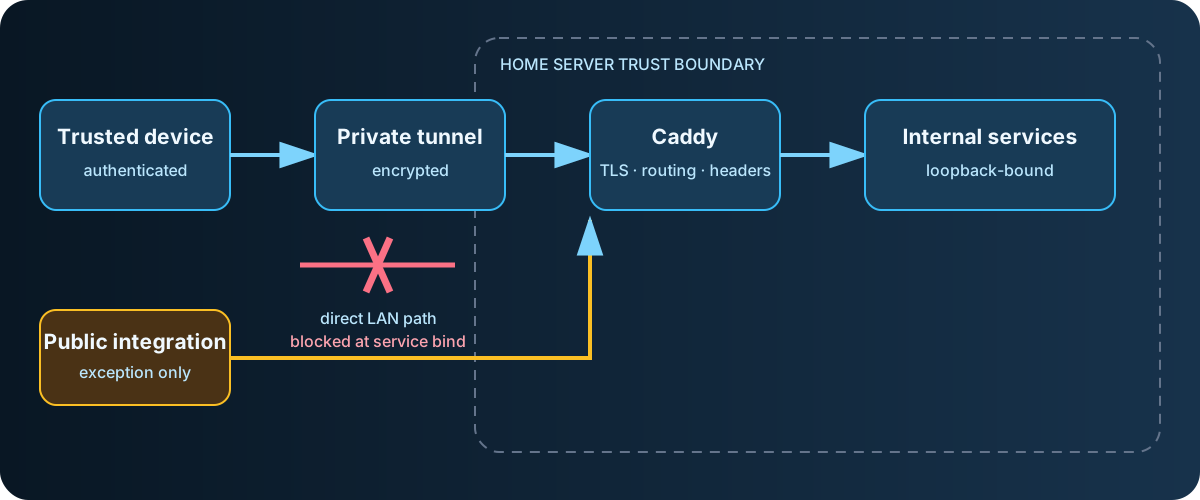
Diagram: Duskcoil. A conceptual trust-boundary view with no concrete addresses or ports.
The Dedicated Tunnel: Tailnet-Only vs. Public Exposure
External access runs on a tool that builds an encrypted mesh network, which offers two exposure modes.
- Tailnet-only: reachable only from devices already authenticated onto the mesh. Most services are exposed this way.
- Public exposure: reachable from anyone on the internet. Used only where there's no way around it — external voice-assistant integration, for instance, which requires a standard port for server-to-server communication.
Even when going public, there are two ways to terminate TLS, and picking the wrong one silently breaks real-time communication (WebSocket). One mode behaves as an HTTPS proxy and advertises HTTP/2 via ALPN. The other only terminates TLS and forwards the connection as raw TCP. With the former, any application that doesn't support WebSocket upgrades over HTTP/2 can't establish a real-time connection. The latter sidesteps the problem entirely, and that's the one in use here.
Reverse Proxy: Centralizing What's Exposed
Exposing each service individually through its own tunnel would mean duplicating shared logic — auth, header injection — for every single service. To avoid that, a single reverse proxy sits in front of everything, and every externally exposed path is required to go through it. The motivation for adopting it was simple: wanting a setup where adding a new service is easy. Before this, each service's tunnel configuration was hand-built individually.
Concretely, each service gets one dedicated internal port, and the reverse proxy's forwarding rules for every port live in a single file. Adding a new service follows a template: append one forwarding block to that file, verify it works, then point the tunnel's forwarding target at that port. Because routing is defined in one place, cross-cutting changes — adding a security header, adding auth — can be made without touching any individual service's own configuration.
What Trying to Consolidate by Subpath Taught Me About Its Limits
When the reverse proxy was first introduced, the initial goal was more ambitious: consolidate several services behind a single exposed port using subpaths (a path hierarchy like /service-a/), cutting down the number of exposed ports itself. Digging into each service, though, it turned out that most self-hosted applications don't officially support subpath serving at all.
- One chat frontend simply doesn't support subpath serving, period.
- One monitoring dashboard would need the reverse proxy to rewrite absolute paths embedded in its HTML (the equivalent of an nginx
sub_filter), which isn't something the reverse proxy's stock features can do safely, so that was shelved. - One notification service does support subpath serving, but doing so would mean changing the base URL the health-check script uses, risking breaking notification delivery, so that was shelved too.
The only case that actually worked out was a media server with an official Base URL setting — that, plus the dashboard app, are the only two consolidated onto a single port. The conclusion was that this approach doesn't generalize, so the rest of the services kept their individual external port numbers, with only the internal forwarding path consolidated behind the reverse proxy — a more conservative approach. A design aiming for generality running into a wall of per-app quirks, and settling for grinding through them one at a time, is a familiar pattern in this kind of consolidation work.
Least Privilege: Restricting What Each Service Listens On
Each service's own listen configuration matters too, as the last line of defense against being reached directly from outside. The rule is: whenever a new service is added, bind it to the loopback address from day one, and open only the specific exposure that's actually needed, explicitly, through the reverse proxy. A lot of software defaults to binding on every interface, and missing that means the service can be reached by some other path entirely — direct access from the same network — that bypasses the reverse proxy altogether.
This check is never really "done." Beyond each service's primary config file, this also covers service definitions split into separate files and helper processes that some other process spins up internally on its own — the actual listening state on the machine is periodically enumerated and cross-checked against what's meant to be exposed, on an ongoing basis.
Questioning the Path Itself: A Blind Spot in Virtualization's Networking Mode
What triggered the check above was discovering that the stated policy — "external access always goes through the tunnel, tailnet-only" — didn't match reality. The cause: the networking mode of the virtualization layer running the containers (WSL2) had been set to "mirrored" to satisfy a separate project running in parallel on the same machine (a robotics-development workspace). Under this mode, binding to every interface at the virtualization layer becomes directly reachable not just from within the tailnet, but from every device on the same LAN. It's a textbook case of a gap opening up between the designer's mental model — dedicated-tunnel access only — and the machine's actual reachability.
That setting can't be changed unilaterally (it's shared with the robotics project's requirements). So instead of closing off the path itself, the fix was to bind each service's own listen address to loopback, so that even with the path open, nothing could actually be reached through it. That's the concrete origin of the least-privilege principle described above.
As a side effect of the same networking mode, it also turned out that the auxiliary NetBIOS name-resolution daemon used by the file-sharing protocol had been crashing continuously ever since the mode change. The cause: it wasn't the virtualization layer but the host OS itself that already held exclusive claim to the specific UDP port used for name resolution, across every interface under mirrored mode (LAN and tunnel alike) — so the equivalent process inside the container failed to bind that same port every single time. File sharing itself was unaffected (all that's lost is the host showing up by name in network browsing lists), and since this is a structural problem that can't be truly fixed without abandoning the networking mode itself, the daemon was simply disabled.
The Blind Spot in the Audit: Separate Files, Separate Processes
Even after running the least-privilege audit once, gaps remained. The main service definitions are consolidated into a single compose file, but a separate service — a photo-management service, whose definition lives in its own independent file — had been missed in the first pass. Going back and enumerating including the separate files turned up that this photo-management service had been left exposed on every interface. Given that it handles well over 19,000 photos and videos, that was a serious miss.
Similarly, the analysis notebook environment wasn't just missing a listen-address fix — it had been running as administrator, with passwordless sudo enabled, with the browser's actual profile (cookies and saved passwords included) mounted directly, and exposed on every interface, all at once. It's a textbook case of the documented assumption — "unpublished, local-only" — drifting from the actual configuration without anyone noticing. The image-generation service, too, had no authentication mechanism and was exposed the same way. All were fixed by binding to loopback, and for the notebook environment, by also cutting back the permissions and mount targets to a minimum.
That experience led to a change in habit: stop treating "check the main definition file" as sufficient, and instead directly enumerate the machine's actual listening state — definitions split into separate files and helper processes auto-started inside containers included — and cross-check that against what's documented. Treat the machine's actual state, not the documented assumption, as the primary source of truth.
The Dashboard App Follows the Same Rule
A dashboard app that lists links to several self-hosted services is also deployed, and it's held to the same least-privilege standard as everything else. It's bound to loopback, and the hostnames it will actually answer to are set as an explicit allowlist, so a request with an unexpected Host header gets rejected. The dashboard also shows each container's running status, and for that it mounts the container-management socket read-only. However, mounting the socket with :ro does not make the Docker API read-only. A process that can connect may still issue control requests. API authorization, a proxy restricting allowed operations, or removing socket access requires separate consideration. See Docker Engine security.
Does a read-only Docker socket mount restrict API operations?
No. Filesystem write restrictions and API authorization are separate. Restrict allowed API operations or avoid exposing the socket.
Comments
Please log in to post a comment
No comments yet.