Contents — find the section you need
Photos, files, passwords. Among personal data, these are the categories where loss is irreversible — so they're managed on a self-hosted platform rather than handed to an external cloud provider. Here's the self-hosted software behind all three, and the actual migration technique used to move the data over.
 Immich
 Nextcloud
 Vaultwarden
Image: Immich / Nextcloud / Vaultwarden logos, Wikimedia Commons


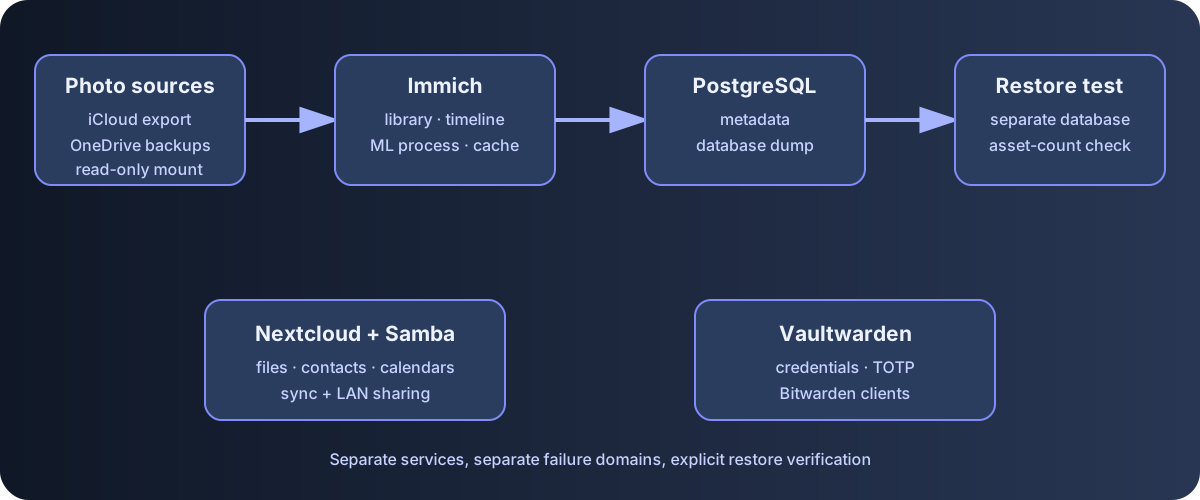
Diagram: Duskcoil. It shows the boundaries among storage, serving, and restore verification.
Photo Management: Immich
Immich is self-hosted photo and video management software with the same feature set you'd expect from a commercial cloud photo service: automatic backup from a phone app, face recognition, a timeline view built from location data. The backend is PostgreSQL (with the pgvector extension for similarity search), and machine-learning inference (face recognition, subject detection) runs in a separate process. All four processes — the main server, ML inference, the database, and the cache — each get their own memory limit, with the ML inference process given a larger allowance than the rest to account for momentary load spikes.
For the migration, 17,784 items from iCloud and the rest from OneDrive were combined into a total of 19,868 photos and videos. Simply copying files over gives no way to verify that everything really made it across, so the total item count at the source was captured up front, exported, and then cross-checked against the number Immich actually ingested. On top of that, Immich's database was dumped before and after the migration so any later discrepancy could be traced back.
Files, Contacts, and Calendar: Nextcloud
Beyond file sync and sharing, Nextcloud also syncs contacts and calendars over CalDAV/CardDAV. The practical upside is that it syncs with the phone's built-in contacts/calendar apps with no extra dedicated app required.
File Sharing: Samba
Alongside Nextcloud, an older-style file share (Samba) also runs in parallel, for devices on the LAN that want to reach files directly. Two shares are published separately: one read-write, and one that exposes the iCloud-derived photos read-only. The latter is read-only for the same reason as Immich's external libraries below — to prevent accidental modification or deletion of the source data.
Password Management: Vaultwarden
Vaultwarden is a self-hosted, API-compatible implementation of Bitwarden, so the official Bitwarden clients (browser extension, phone app) work with it out of the box. TOTP-based two-factor authentication works without any extra server-side setup (no SMTP needed), so 2FA via an authenticator app is enabled.
Integrating Multiple Photo Sources into Immich
Immich isn't fed from a single backup source — several external sources are mounted into it as read-only external libraries. Photos originating from iCloud, a shared OneDrive backup, and a personal OneDrive backup are each passed into the container as their own independent mount point, and Immich treats each one as a separate external library. They're mounted read-only so that Immich's library-scanning process can never accidentally modify or delete the source data — a safety-first design given that photos are, once lost, unrecoverable.
Files sourced from OneDrive with no capture-date EXIF data (screenshots, for instance) would otherwise scatter randomly across the timeline. To deal with that, those files' date metadata was uniformly set to the earliest possible date, so they all sort together at the very bottom (oldest end) of the timeline. The rough equivalent of iCloud's "Favorites" album was also carried over: a dedicated album was created, and the favorite flag was re-set individually — 389 of roughly 933 equivalent items have been migrated so far.
The Fight Against Rate Limiting During the iCloud Migration
Migrating photos from iCloud (17,784 items) didn't finish with a single bulk download. The download tool in use exits cleanly at the end of each run (each "pass"), but Apple enforces a rate limit on how many items can be downloaded per pass — exceed it, and that pass ends without picking up any more new photos. The conditions that trigger this limit are irregular; watching the actual runs, no clear pattern emerged (a little over 70% of nearly 300 runs finished having downloaded zero items, with no correlation found to time of day or interval). The fix was simply to keep the tool running in an always-restart mode until the full download finished, grinding through pass after pass. Once complete, it was switched from an infinite-retry loop to a single scheduled run once a day, cutting down on wasted API calls.
The other obstacle: API access from anything other than the (near-official) download tool gets blocked consistently. Even reusing the exact same session cookie, going through a different script got rejected with an authentication error. The likely explanation is that Apple is fingerprinting the client at the TLS/HTTP level. That constraint effectively rules out scripting any operation the download tool itself doesn't support — bulk-deleting photos, for instance. iCloud Drive's item count was small enough to handle by hand, but doing the same for 17,784 photos isn't realistic, so deletion itself was set aside. As a workaround, it turned out the download tool's own per-album fetch feature could retrieve just the contents listing of a specific album (Favorites, for instance) — and that's what made migrating the favorites information possible.
Verifying That a Backup Actually Restores
Just taking a backup doesn't tell you whether it can actually be restored. The latest Immich database dump was actually restored into a separate, purpose-built test PostgreSQL container, and the asset count after restoration was confirmed to match the production count exactly. The reasoning: a backup that's never been verified carries risk not all that different from having no backup at all.
Pinning Versions: An Operational Choice
Nextcloud and Vaultwarden are explicitly excluded from Watchtower's automatic updates, with their container image tags pinned to specific version numbers. Nextcloud handles real contact and calendar data, and a major-version update requires checking upgrade-path compatibility via its internal command (occ), so tags are only bumped by hand after reading the release notes. Vaultwarden, given that it's password management, treats an unintended automatic update as a risk in itself, so tags are strictly bumped by hand only after reviewing the changelog.
A Blind Spot from Being Managed in a Separate File
Immich's definition file is managed independently from the rest of the main service fleet. Because of that structural quirk, when a cross-service audit of listen configurations was run across the whole server, Immich was the one service that got missed on the first pass — and it turned out to have been left exposed on every interface all along. Given a total of 19,868 photos and videos, that was a serious miss, and it was fixed to loopback-only immediately after being discovered. The lesson: any service whose definition doesn't live in the single consolidated file is that much more likely to slip through a cross-service audit.
An Irreversible Decision in the Migration
For photos, files, and passwords alike, the policy after migration was to delete the data on the original cloud service and run the self-hosted platform as the single source of truth. Running both in parallel as a backup was an option, but keeping two sources of truth risks losing track of which one is actually current whenever an update fails to propagate to both — so it was deliberately consolidated into one.
Does a successful backup log establish recoverability?
Test restoration, including database, configuration, and version compatibility as well as files.
Comments
Please log in to post a comment
No comments yet.