Contents — find the section you need
Change parameters and verify
Open the panel, then press Run to load Python. You can stop execution and reset parameters. Results are computed on this device. No Python installation is required.
Local execution steps below are optional for reproducing the source results; they are not required for the browser experiment.
Try the frame pair
Run translation, save A, then try rotation or large displacement as B. Play alternates the same two frames every 500 ms; pause and step to inspect vectors. This display speed is independent of the frame interval. Shared URLs reproduce controls, not saved A.
Model and limits
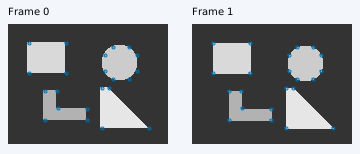
The first frame uses Shi–Tomasi corners (at most 60). A single-scale Lucas–Kanade solver estimates local translation from image patches with fixed template gradients, bilinear sampling and zero initial displacement. The default radius 4 gives a 9×9 patch; stop at an update of 0.001 px or the iteration limit. There is no pyramid, re-detection, brightness correction or dense flow. Low texture and a straight edge can leave motion undetermined; when no corner is found, a labelled central probe demonstrates this failure.
Brightness constancy assumes the same surface keeps its image intensity between frames. Target gain and occlusion violate this assumption. Changing brightness does not recover clipped information. A separate brightness/luminance Lab is planned; these grayscale values are encoded image intensities, not calibrated physical luminance. Large motion, rotation and repeated patterns can produce wrong estimates even when the solver converges.
Read errors and units
Endpoint error (EPE) is the Euclidean distance in pixels between an estimated endpoint and the known transformed point. Truth never enters the estimator. Evaluation requires every bilinear-support pixel of the transformed reference patch to remain visible, excluding padding and occlusion. The mean uses only visible points with finite estimates, including iteration-limit results. Visible and evaluated counts differ; “—” means no evaluated estimate, not zero error. Displacement is px/frame-pair; dividing by interval in seconds gives image rate in px/s, not physical velocity or camera pose. Changing interval keeps the image pair and EPE unchanged.
Recorded synthetic results
These numbers are calculated from the packaged synthetic presets, not camera measurements. Blue arrows are estimates, dashed lines indicate the iteration limit, orange crosses have no estimate, and magenta squares mark visible truth in frame 1. Small residuals or convergence alone do not prove correct tracking.
| Preset | Detected | Converged | Visible | Evaluated | Mean EPE [px] |
|---|---|---|---|---|---|
| Translation | 22 | 22 | 22 | 22 | 0.00003115 |
| Rotation | 22 | 18 | 22 | 22 | 1.24375425 |
| Low texture | 0 | 0 | 1 | 0 | — |
| Edge / aperture | 0 | 0 | 1 | 0 | — |
| Occlusion | 22 | 18 | 18 | 18 | 0.00003410 |
| Large displacement | 22 | 6 | 21 | 21 | 13.64755347 |
| Brightness change | 22 | 0 | 22 | 22 | 13.52716816 |
| Repeated pattern | 60 | 44 | 52 | 42 | 15.83858223 |
Related experiments and sources
- Feature extraction Lab
- Feature matching Lab
- Feature tracking: theory
- Visual SLAM
- Source ZIP
- Recorded results (JSON)
- Lucas & Kanade, IJCAI 1981
- OpenCV optical flow tutorial
Image brightness and luminance Lab — exposure, gamma and clipping
Comments
Please log in to post a comment
No comments yet.