Contents — find the section you need
For a first Nav2 experiment, separate mapping from navigation on a saved map using the official TurtleBot simulation. This procedure follows Jazzy documentation checked on September 7, 2026. Gazebo was not run in the writing environment.
Record the environment
Use Ubuntu 24.04 with a GUI, ROS 2 Jazzy and its compatible Gazebo environment. With ROS 2 already installed, prepare packages following the Nav2 Quickstart. Do not mix Humble-era Gazebo Classic instructions into this setup.
source /opt/ros/jazzy/setup.bash
sudo apt update
sudo apt install ros-jazzy-navigation2 ros-jazzy-nav2-bringup ros-jazzy-slam-toolbox ros-jazzy-nav2-minimal-tb3-sim
dpkg-query -W ros-jazzy-navigation2 ros-jazzy-nav2-bringup ros-jazzy-slam-toolbox ros-jazzy-nav2-minimal-tb3-sim
ros2 launch nav2_bringup tb3_simulation_launch.py --show-args
Save the installed versions and verify slam, map and use_sim_time arguments against the Jazzy launch source.
Start mapping mode
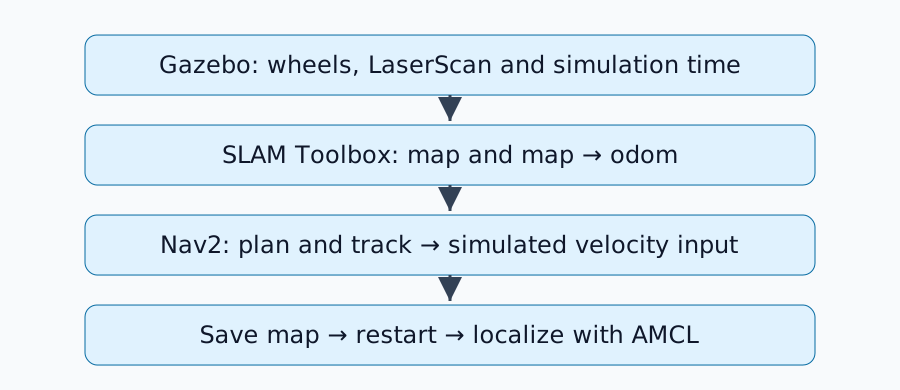
Use a dedicated ROS environment without physical robots. The domain ID below is an example; confirm that no real robot shares it. Use the same setup in each new terminal.
source /opt/ros/jazzy/setup.bash
export ROS_DOMAIN_ID=73
ros2 launch nav2_bringup tb3_simulation_launch.py slam:=True headless:=False use_sim_time:=True
In the official SLAM procedure, SLAM supplies /map and map → odom. Do not add AMCL as a second publisher of that transform during mapping.
Try nearby goals
In another terminal, source the environment and set export ROS_DOMAIN_ID=73, then inspect the interfaces.
ros2 topic list
ros2 topic hz /scan
ros2 run tf2_ros tf2_echo map base_link
Check that the map, LaserScan and robot pose agree in RViz. Set a Nav2 Goal in nearby observed free space, then move toward the next area. A goal deep inside unknown space can fail planning even while SLAM works correctly.
Save the map and restart
From another terminal with the same environment, save into a new working directory. Choose a filename that will not overwrite a map you need.
mkdir -p nav2-map-lab
cd nav2-map-lab
ros2 run nav2_map_server map_saver_cli -f map --ros-args -p use_sim_time:=true
Keep both map.yaml and its referenced image. Stop the original launch with Ctrl+C and wait for shutdown. From the nav2-map-lab directory, restart with the saved map.
ros2 launch nav2_bringup tb3_simulation_launch.py slam:=False map:="$PWD/map.yaml" headless:=False use_sim_time:=True
Use RViz's 2D Pose Estimate to set the robot's current simulated location and heading. Request a nearby goal and check both path generation and arrival. Saved-map localization serves a different purpose from updating a map with SLAM.
Diagnose failures by interface
| Symptom | First check |
|---|---|
| Missing robot or world | Simulator logs and installed models |
| Missing map | /scan, SLAM node and simulation clock |
| Missing TF | Shared domain, timestamps and frame names |
| Misaligned saved map | YAML image reference and initial pose |
| No path | Known free-space goal and robot footprint clearance |
Keep versions, commands, maps and success or failure logs at each stage. The newbot implementation record includes 3D LiDAR and a different odometry source; identify each change from this minimal setup as you read it.
Comments
Please log in to post a comment
No comments yet.