Contents — find the section you need
A visible path does not guarantee that a feasible velocity command exists from the current pose. Diagnose planning and execution separately. This workflow targets ROS 2/Nav2 Jazzy and was checked against documentation; it is not a hardware driving report.
Capture one stopped interval
Collect the global path, local/global costmaps, footprint, TF, odometry, velocity commands, action result and logs. Overlay data at consistent times and frames in RViz. Do not compare startup data with a later snapshot as if they were simultaneous. rosbag2 replay helps hold inputs fixed.
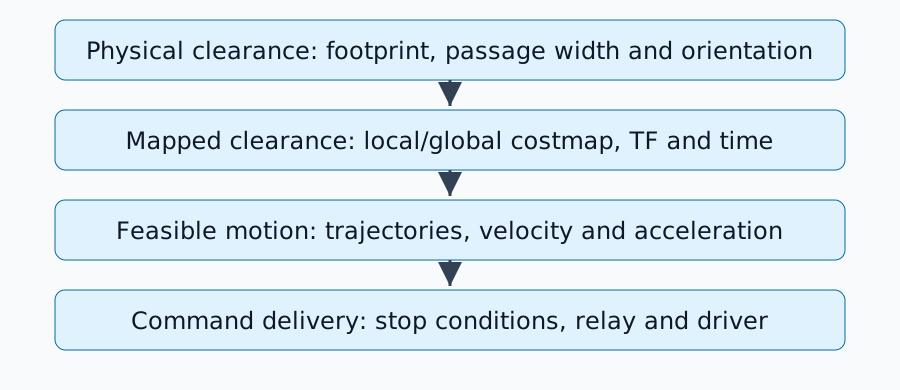
Check physical geometry
A 0.60 m wide robot centered and aligned in a 0.80 m corridor has 0.10 m clearance on each side. This static calculation excludes localization error, mapped wall thickness, payload and corner sweep during rotation. A rectangle's required width changes with orientation.
A footprint describes a polygon; robot_radius provides a circular approximation. Compare the configured outline with RViz, checking metres, the base_link origin and protruding sensors or loads. The Nav2 tuning guide covers shape and cost fields. Do not shrink the outline below the real robot just to remove a stop.
Cost is not identical to a physical wall
Obstacle layers incorporate observations; inflation spreads distance-dependent cost around obstacles. inflation_radius sets its extent, while cost_scaling_factor controls exponential decay. With other conditions fixed, a larger scaling factor produces faster decay. See Inflation Layer parameters.
Not every high-cost band is an absolute forbidden region, and inflation_radius alone is not a guaranteed minimum body clearance. Account for collision checking, footprint and each planner/controller's cost use. If the global map permits passage but the local map retains old obstacles, investigate clearing, observation range and valid TF timestamps first.
Connect a path to feasible motion
A path specifies where to travel. A controller must generate motion consistent with current velocity and constraints. Large orientation changes in tight spaces, in-place turns requested of a vehicle with a minimum turning radius, or acceleration limits can make candidate motions infeasible.
The Controller Server documentation describes controller, progress-checker and goal-checker selection. Progress and arrival are distinct conditions. Record plugin names and errors before inspecting plugin-specific constraints.
Trace where the command disappears
| Observation | Next check |
|---|---|
| Controller cannot produce a valid command | Local costmap, TF, motion limits and candidate trajectories |
| Controller output is nonzero but final output is zero | Smoother, collision monitor, stop input and command priority |
| Final output is nonzero but wheels do not move | Topic/type, driver, enable state and control mode |
| Robot moves but quickly reports failure | Odometry versus actual movement and progress conditions |
Do not assume a topic named /cmd_vel is the final stage. Configurations have intermediate topics and may use Twist or TwistStamped. Inspect actual publisher, subscriber and type with ros2 topic info <actual-topic> --verbose. Diagnose the condition that triggered a stop instead of disabling stop functions.
Evaluate one change at a time
Fix passage, initial pose, goal, map and input log. Change one item, then compare minimum clearance, stop count, commands and failure reasons as well as arrival. The 0.10 m arithmetic example cannot establish safe operating clearance; real dimensions, errors and operating conditions need separate assessment.
If startup itself is unreliable, return to the minimal Nav2 setup. A stable configuration makes it easier to distinguish mapping failures from driver failures.
Comments
Please log in to post a comment
No comments yet.