Contents — find the section you need
Repeated physical runs change inputs as well as settings. rosbag2 can hold recorded inputs fixed, but replay does not reproduce an entire robot deterministically. This is a procedure checked against ROS 2 Jazzy primary sources on 2026-09-07; it has not been executed on ROS hardware or a running ROS installation.
Define the comparison boundary
Consider a localizer consuming LiDAR and wheel odometry. Record /scan, /odom and the required /tf and /tf_static. Save the localizer's output separately as a comparison result, not ground truth. Camera experiments also need matching CameraInfo.
The Jazzy README documents recording, inspection and QoS overrides. Save installed package versions and the output of ros2 bag record --help and ros2 bag play --help with each experiment.
Record inputs and configuration
Topic and node names below are examples. Discover yours with ros2 topic list and ros2 node list, then record while inputs are active:
ros2 topic info /scan --verbose
ros2 bag record -o replay-input --topics /scan /odom /tf /tf_static
Stop cleanly with Ctrl+C, then inspect:
ros2 bag info replay-input
ros2 param dump /localizer > localizer-A.yaml
Replace /localizer with your node. Also preserve launch files, maps, URDF, external calibration, software commit and initial pose. Nonzero message counts do not establish that every necessary input exists during the failure interval. Examine timestamp offsets and gaps per sensor.
Use one time source and one publisher per transform
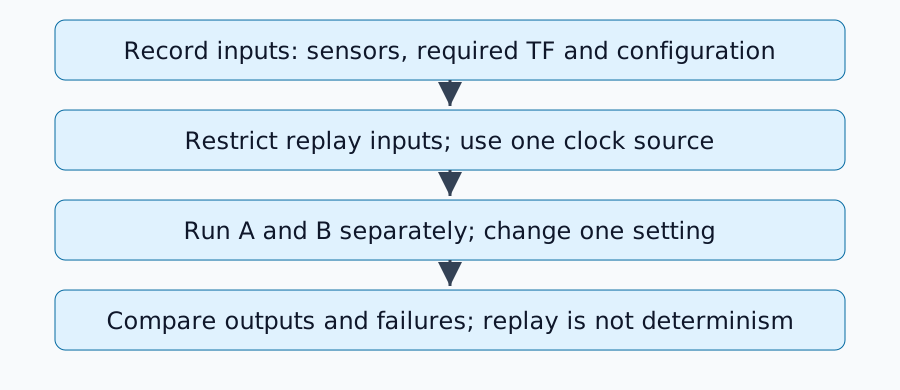
In an analysis environment with live input publishers stopped, configure the target node and RViz with use_sim_time=true. Launch details depend on the package, then replay:
ros2 bag play replay-input --clock 100 --rate 1.0
The Jazzy player implementation defines the clock option. Do not run another /clock publisher concurrently. Recording with --use-sim-time and publishing a clock during playback have different roles.
A /tf topic can contain multiple transforms. If the evaluated node now generates map→odom, do not also replay the recorded map→odom. Required input odom→base_link may still need replay. Excluding the whole topic may therefore be insufficient: separate output at recording time or filter individual transforms. See REP-105 for frame roles.
Diagnose missing output
| Symptom | First check |
|---|---|
| Messages exist in the bag but are not received | Names, types and publisher/subscriber QoS |
| Cloud appears but pose jumps | Duplicate publishers of the same transform |
| TF extrapolation into past or future | Header times, simulation time and recorded TF coverage |
| Only the second replay differs | Estimator state, maps and handling of backward time jumps |
QoS describes delivery reliability and history. Check compatibility using topic info --verbose; do not blindly make every topic reliable. Apply override YAML only where needed. Changes to static-TF durability also require checking delivery to late subscribers.
Design an A/B run sheet
Stop A, reset state and launch B with one changed setting. Keep the bag, playback rate, initial pose, map and evaluated interval fixed. Save trajectory, processing latency, missing inputs and failure times. Repeat unchanged conditions to reveal scheduling or randomness effects.
This evaluates reactions to fixed observations. A different control command would change future real observations, so replaying prerecorded sensors cannot establish closed-loop driving performance.
Completion criteria
The comparison is ready when required inputs arrive, each transform has one publisher, time is consistent and configuration differences explain the tested change. Continue with SLAM evaluation for temporal alignment and trajectory errors.
Comments
Please log in to post a comment
No comments yet.