Contents — find the section you need
Change parameters and verify
Open the panel, then press Run to load Python. You can stop execution and reset parameters. Results are computed on this device. No Python installation is required.
Local execution steps below are optional for reproducing the source results; they are not required for the browser experiment.
The experiment controls are in English.
Audit a fixed replay in your browser
Use the panel above to compare clock settings, timestamp offsets, reliability QoS and TF selection. The Lab computes a synthetic replay audit, not ROS, DDS, tf2, a localizer or a robot simulation. It opens no bag files and connects to no robot. The ROS commands below are optional follow-up procedures.
Every run uses eleven scan records at bag times 10.0–12.0 s, spaced 0.2 s apart. Recorded input odom → base_link samples span 9.8–12.2 s at the same spacing. These are invented teaching fixtures, not hardware measurements. The timestamp control adds an offset to scan headers only; bag recording times and TF stamps stay fixed. It represents a differently stamped sensor fixture, not a rosbag2 playback option. Elapsed playback time is (bag time − 10 s) / rate. At 2×, the scan span becomes 1 s while the headers remain in their original time domain.
Read the four checks separately
- Modeled receipt: choose the publisher's offered and subscriber's requested reliability independently. Best-effort offered to reliable requested is incompatible; the other three combinations are compatible. Topic names/types and every other QoS policy are assumed compatible. All compatible scans arrive in this loss-free model. This does not promise real best-effort delivery, establish actual rosbag2 auto-selected QoS, or model queues, deadlines, lifespan, discovery or late subscribers.
- Recorded TF coverage: the scan header must fall within the recorded input TF interval, including endpoints. This is an audit of the complete recording, even when the modeled subscriber receives no scans. It does not simulate tf2's live cache, arrival ordering, interpolation, waiting, or transform availability at a callback. A stamp inside the interval is therefore not proof that a live lookup succeeds.
- Clock difference: the replay-clock fixture sets the node's latest
/clockvalue equal to each scan's bag time, assuming a clock update arrives before each scan. The system-clock fixture starts at the arbitrary value 1000 s and advances by elapsed playback time. Withuse_sim_timebut no received clock, node time is zero and the diagnostic is not evaluated, shown as a dash. For initialized clocks, the Lab counts|node now − scan header| ≤ 150 ms. That symmetric window is a teaching diagnostic, not a ROS validity rule, tf2 tolerance or localizer timeout. It is independent of receipt and TF coverage. - TF publishers: the evaluated localizer is configured to publish
map → odom. “Input transforms only” keeps recordedodom → base_link; “all recorded transforms” adds a secondmap → odompublisher; “exclude all recorded TF” removes the required input edge. Counts describe configured sources, not a computed localization result. Duplicate-source behavior and static-TF durability are not simulated.
Save the default as A and try B with 2× playback, a +400 ms header offset, no clock, a reliability mismatch, or a different TF selection. The plots use common A/B axes. With +400 ms, the last scan is beyond the recorded TF interval; all eleven scans lie outside the teaching clock window. With a missing clock, that window's count is unavailable rather than zero. Neither finding predicts trajectory error. The data table and JSON retain each scan's recording time, header, elapsed time, node time and independent check outcomes.
Reference and scope
The model's rules were reviewed on 2026-09-20 against the rosbag2 Jazzy README, Jazzy player options, Jazzy QoS documentation source, ROS clock design, Jazzy tf2 time tutorial source and REP-105 frame roles. No ROS installation was executed for this Lab.
Each A/B run starts fresh. Scheduling, packet loss, estimator memory, backward time jumps, multiple clock publishers, calibration, static TF, map accuracy and closed-loop driving remain outside this exercise. Use the SLAM evaluation Lab for a separate trajectory-error exercise. Browser checks do not replace the real replay checks below.
重复的物理运行会改变输入和设置。rosbag2 可以固定记录的输入,但回放无法确定性地重现整个机器人。此流程已于 2026 年 9 月 7 日根据 ROS 2 Jazzy 的主要文档进行验证;尚未在 ROS 硬件或正在运行的 ROS 系统上执行。
定义比较边界
考虑一个使用激光雷达和轮式里程计的定位器。记录 /scan、/odom 以及所需的 /tf 和 /tf_static。将定位器的输出单独保存为比较结果,而非真实值。相机实验还需要匹配的 CameraInfo。
Jazzy README 文档记录了记录、检查和 QoS 覆盖设置。每次实验时,保存已安装软件包的版本以及 ros2 bag record --help 和 ros2 bag play --help 的输出。
记录输入和配置
以下主题和节点名称仅为示例。请使用 ros2 topic list 和 ros2 node list 查找您的节点,然后在输入激活时进行记录:
ros2 topic info /scan --verbose
ros2 bag record -o replay-input --topics /scan /odom /tf /tf_static
使用 Ctrl+C 正常停止,然后检查:
ros2 bag info replay-input
ros2 param dump /localizer > localizer-A.yaml
将 /localizer 替换为您的节点。同时保留启动文件、地图、URDF、外部标定、软件提交和初始位姿。非零消息计数并不代表故障期间所有必要的输入都存在。请检查每个传感器的时间戳偏移和间隙。
每个变换使用一个时间源和一个发布者
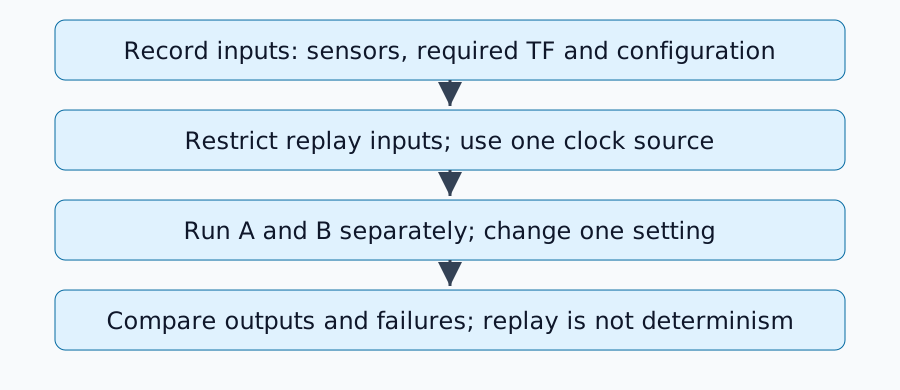
在停止实时输入发布者的分析环境中,使用 use_sim_time=true 配置目标节点和 RViz。启动细节取决于软件包,然后进行回放:
ros2 bag play replay-input --clock 100 --rate 1.0
Jazzy 播放器实现定义了时钟选项。请勿同时运行另一个/clock发布器。使用--use-sim-time进行录制和在回放期间发布时钟的作用不同。
一个/tf主题可以包含多个变换。如果被评估的节点现在生成地图→里程计,则不要再回放已录制的地图→里程计。所需的输入里程计→基准链接可能仍然需要回放。因此,排除整个主题可能不够:在录制时单独输出或过滤单个变换。有关帧角色,请参阅REP-105。
诊断缺失的输出
| 症状 | 初步检查 |
|---|---|
| 消息存在于数据包中但未被接收 | 名称、类型和发布者/订阅者 QoS |
| 云出现但姿态跳跃 | 同一变换的重复发布者 |
| 变换外推至过去或未来 | 头部时间、仿真时间和记录的变换覆盖率 |
| 仅第二次回放不同 | 估计器状态、地图和对回溯时间跳跃的处理 |
QoS 描述了交付可靠性和历史记录。使用 topic info --verbose 检查兼容性;不要盲目地将每个主题都设置为可靠。仅在需要时应用覆盖 YAML。对静态变换持久性的更改还需要检查对延迟订阅者的交付情况。
设计 A/B 测试表
停止 A,重置状态,然后启动 B,并更改一个设置。保持包、回放速率、初始姿态、地图和评估间隔不变。保存轨迹、处理延迟、缺失输入和故障时间。重复未更改的条件以揭示调度或随机性的影响。
这评估了对固定观测值的响应。不同的控制指令会改变未来的实际观测结果,因此重放预先录制的传感器数据无法建立闭环驾驶性能。
完成标准
当所需输入全部到达、每个变换都只有一个发布者、时间一致且配置差异能够解释所测试的变化时,比较即可完成。接下来进行SLAM评估,以评估时间对齐和轨迹误差。
评论
请先登录。
暂无数据。