Contents — find the section you need
Change parameters and verify
Open the panel, then press Run to load Python. You can stop execution and reset parameters. Results are computed on this device. No Python installation is required.
Local execution steps below are optional for reproducing the source results; they are not required for the browser experiment.
The experiment controls are in English.
Audit a fixed replay in your browser
Use the panel above to compare clock settings, timestamp offsets, reliability QoS and TF selection. The Lab computes a synthetic replay audit, not ROS, DDS, tf2, a localizer or a robot simulation. It opens no bag files and connects to no robot. The ROS commands below are optional follow-up procedures.
Every run uses eleven scan records at bag times 10.0–12.0 s, spaced 0.2 s apart. Recorded input odom → base_link samples span 9.8–12.2 s at the same spacing. These are invented teaching fixtures, not hardware measurements. The timestamp control adds an offset to scan headers only; bag recording times and TF stamps stay fixed. It represents a differently stamped sensor fixture, not a rosbag2 playback option. Elapsed playback time is (bag time − 10 s) / rate. At 2×, the scan span becomes 1 s while the headers remain in their original time domain.
Read the four checks separately
- Modeled receipt: choose the publisher's offered and subscriber's requested reliability independently. Best-effort offered to reliable requested is incompatible; the other three combinations are compatible. Topic names/types and every other QoS policy are assumed compatible. All compatible scans arrive in this loss-free model. This does not promise real best-effort delivery, establish actual rosbag2 auto-selected QoS, or model queues, deadlines, lifespan, discovery or late subscribers.
- Recorded TF coverage: the scan header must fall within the recorded input TF interval, including endpoints. This is an audit of the complete recording, even when the modeled subscriber receives no scans. It does not simulate tf2's live cache, arrival ordering, interpolation, waiting, or transform availability at a callback. A stamp inside the interval is therefore not proof that a live lookup succeeds.
- Clock difference: the replay-clock fixture sets the node's latest
/clockvalue equal to each scan's bag time, assuming a clock update arrives before each scan. The system-clock fixture starts at the arbitrary value 1000 s and advances by elapsed playback time. Withuse_sim_timebut no received clock, node time is zero and the diagnostic is not evaluated, shown as a dash. For initialized clocks, the Lab counts|node now − scan header| ≤ 150 ms. That symmetric window is a teaching diagnostic, not a ROS validity rule, tf2 tolerance or localizer timeout. It is independent of receipt and TF coverage. - TF publishers: the evaluated localizer is configured to publish
map → odom. “Input transforms only” keeps recordedodom → base_link; “all recorded transforms” adds a secondmap → odompublisher; “exclude all recorded TF” removes the required input edge. Counts describe configured sources, not a computed localization result. Duplicate-source behavior and static-TF durability are not simulated.
Save the default as A and try B with 2× playback, a +400 ms header offset, no clock, a reliability mismatch, or a different TF selection. The plots use common A/B axes. With +400 ms, the last scan is beyond the recorded TF interval; all eleven scans lie outside the teaching clock window. With a missing clock, that window's count is unavailable rather than zero. Neither finding predicts trajectory error. The data table and JSON retain each scan's recording time, header, elapsed time, node time and independent check outcomes.
Reference and scope
The model's rules were reviewed on 2026-09-20 against the rosbag2 Jazzy README, Jazzy player options, Jazzy QoS documentation source, ROS clock design, Jazzy tf2 time tutorial source and REP-105 frame roles. No ROS installation was executed for this Lab.
Each A/B run starts fresh. Scheduling, packet loss, estimator memory, backward time jumps, multiple clock publishers, calibration, static TF, map accuracy and closed-loop driving remain outside this exercise. Use the SLAM evaluation Lab for a separate trajectory-error exercise. Browser checks do not replace the real replay checks below.
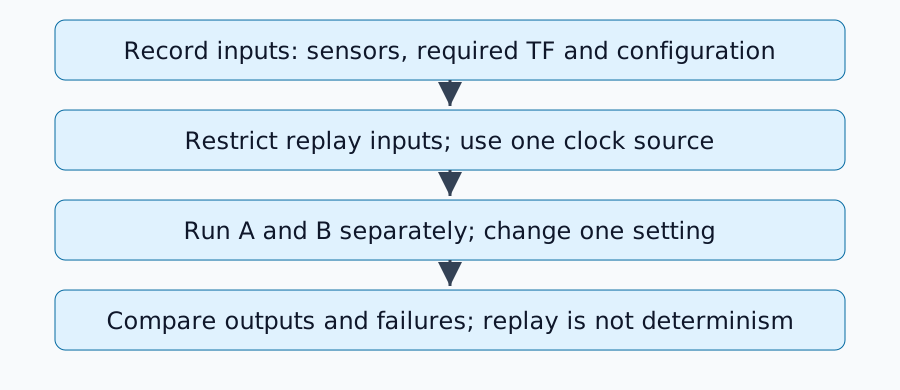
반복적인 물리적 실행은 설정뿐만 아니라 입력값도 변경합니다. rosbag2는 기록된 입력값을 고정할 수 있지만, 재생은 로봇 전체를 결정론적으로 재현하지 못합니다. 이 절차는 2026년 9월 7일에 ROS 2 Jazzy 기본 소스를 기준으로 검증되었으며, ROS 하드웨어 또는 실행 중인 ROS 설치 환경에서 실행되지 않았습니다.
비교 범위 정의
LiDAR 및 휠 오도메트리를 사용하는 로컬라이저를 고려해 보겠습니다. /scan, /odom 및 필수 /tf, /tf_static을 기록합니다. 로컬라이저의 출력은 정답값이 아닌 비교 결과로 별도로 저장합니다. 카메라 실험에는 일치하는 CameraInfo도 필요합니다.
Jazzy README에는 기록, 검사 및 QoS 재정의에 대한 내용이 설명되어 있습니다. 각 실험마다 설치된 패키지 버전과 ros2 bag record --help 및 ros2 bag play --help 명령의 출력 결과를 저장하십시오.
입력 및 구성 기록
아래 토픽 및 노드 이름은 예시입니다. ros2 topic list 및 ros2 node list 명령을 사용하여 실제 노드를 확인한 후, 입력이 활성화된 동안 다음 내용을 기록하십시오.
ros2 topic info /scan --verbose
ros2 bag record -o replay-input --topics /scan /odom /tf /tf_static
Ctrl+C를 눌러 정상적으로 종료한 후 다음 내용을 확인하십시오.
ros2 bag info replay-input
ros2 param dump /localizer > localizer-A.yaml
/localizer 부분을 실제 노드 이름으로 바꾸십시오. 또한 실행 파일, 맵, URDF 파일, 외부 보정, 소프트웨어 커밋 및 초기 포즈도 저장하십시오. 메시지 수가 0이 아니라고 해서 오류 발생 구간 동안 필요한 모든 입력이 존재했음을 의미하는 것은 아닙니다. 센서별 타임스탬프 오프셋 및 간격을 확인하십시오.
변환당 하나의 시간 소스와 하나의 퍼블리셔만 사용
실시간 입력 퍼블리셔가 중지된 분석 환경에서는 use_sim_time=true을 사용하여 대상 노드와 RViz를 구성합니다. 실행 세부 정보는 패키지에 따라 다르며, 그 후 재생합니다.
ros2 bag play replay-input --clock 100 --rate 1.0
Jazzy 플레이어 구현에서 클록 옵션을 정의합니다. 다른 /clock 퍼블리셔를 동시에 실행하지 마십시오. --use-sim-time을 사용한 기록과 재생 중 클록 게시의 역할은 다릅니다.
/tf 토픽에는 여러 변환이 포함될 수 있습니다. 평가 대상 노드가 map→odom을 생성하는 경우, 기록된 map→odom을 재생하지 마십시오. 필수 입력 odom→base_link는 여전히 재생해야 할 수 있습니다. 따라서 전체 토픽을 제외하는 것만으로는 불충분할 수 있습니다. 녹화 시점에 출력을 분리하거나 개별 변환을 필터링하십시오. 프레임 역할에 대해서는 REP-105를 참조하십시오.
출력 누락 진단
| 증상 | 첫 번째 확인 사항 |
|---|---|
| 메시지가 백에 존재하지만 수신되지 않음 | 이름, 유형 및 게시자/구독자 QoS |
| 클라우드가 나타나지만 포즈 점프 발생 | 동일한 변환의 중복 게시자 |
| 과거 또는 미래로의 TF 외삽 | 헤더 시간, 시뮬레이션 시간 및 기록된 TF 범위 |
| 두 번째 재생만 다름 | 추정기 상태, 맵 및 시간 역행 점프 처리 |
QoS는 전달 신뢰성과 이력을 나타냅니다. topic info --verbose을 사용하여 호환성을 확인하십시오. 모든 토픽을 무조건 신뢰할 수 있도록 만들지 마십시오. 필요한 경우에만 오버라이드 YAML을 적용하십시오. 정적 TF 지속성 변경 시 지연된 구독자에 대한 전달도 확인해야 합니다.
A/B 테스트 실행 계획표 설계
A 시스템을 정지하고 상태를 초기화한 후, 설정 하나만 변경하여 B 시스템을 실행합니다. 데이터셋(bag), 재생 속도, 초기 자세, 지도, 평가 간격은 고정합니다. 궤적, 처리 지연 시간, 누락된 입력, 오류 시간을 저장합니다. 변경되지 않은 조건으로 테스트를 반복하여 스케줄링 또는 무작위성 효과를 확인합니다.
이 테스트는 고정된 관측값에 대한 반응을 평가합니다. 다른 제어 명령을 사용하면 향후 실제 관측값이 변경되므로, 미리 기록된 센서 데이터를 재생하는 방식으로는 폐루프 주행 성능을 검증할 수 없습니다.
완료 기준
필요한 입력값이 도착하고, 각 변환에 대해 하나의 퍼블리셔가 있으며, 시간이 일정하고, 구성 차이가 테스트된 변경 사항을 설명할 수 있을 때 비교가 완료됩니다. 시간 정렬 및 궤적 오류에 대해서는 SLAM 평가를 참조하십시오.
댓글
먼저 로그인해 주세요.
아직 데이터가 없습니다.