Contents — find the section you need
Change parameters and verify
Open the panel, then press Run to load Python. You can stop execution and reset parameters. Results are computed on this device. No Python installation is required.
Local execution steps below are optional for reproducing the source results; they are not required for the browser experiment.
The experiment controls are in English.
Audit a fixed replay in your browser
Use the panel above to compare clock settings, timestamp offsets, reliability QoS and TF selection. The Lab computes a synthetic replay audit, not ROS, DDS, tf2, a localizer or a robot simulation. It opens no bag files and connects to no robot. The ROS commands below are optional follow-up procedures.
Every run uses eleven scan records at bag times 10.0–12.0 s, spaced 0.2 s apart. Recorded input odom → base_link samples span 9.8–12.2 s at the same spacing. These are invented teaching fixtures, not hardware measurements. The timestamp control adds an offset to scan headers only; bag recording times and TF stamps stay fixed. It represents a differently stamped sensor fixture, not a rosbag2 playback option. Elapsed playback time is (bag time − 10 s) / rate. At 2×, the scan span becomes 1 s while the headers remain in their original time domain.
Read the four checks separately
- Modeled receipt: choose the publisher's offered and subscriber's requested reliability independently. Best-effort offered to reliable requested is incompatible; the other three combinations are compatible. Topic names/types and every other QoS policy are assumed compatible. All compatible scans arrive in this loss-free model. This does not promise real best-effort delivery, establish actual rosbag2 auto-selected QoS, or model queues, deadlines, lifespan, discovery or late subscribers.
- Recorded TF coverage: the scan header must fall within the recorded input TF interval, including endpoints. This is an audit of the complete recording, even when the modeled subscriber receives no scans. It does not simulate tf2's live cache, arrival ordering, interpolation, waiting, or transform availability at a callback. A stamp inside the interval is therefore not proof that a live lookup succeeds.
- Clock difference: the replay-clock fixture sets the node's latest
/clockvalue equal to each scan's bag time, assuming a clock update arrives before each scan. The system-clock fixture starts at the arbitrary value 1000 s and advances by elapsed playback time. Withuse_sim_timebut no received clock, node time is zero and the diagnostic is not evaluated, shown as a dash. For initialized clocks, the Lab counts|node now − scan header| ≤ 150 ms. That symmetric window is a teaching diagnostic, not a ROS validity rule, tf2 tolerance or localizer timeout. It is independent of receipt and TF coverage. - TF publishers: the evaluated localizer is configured to publish
map → odom. “Input transforms only” keeps recordedodom → base_link; “all recorded transforms” adds a secondmap → odompublisher; “exclude all recorded TF” removes the required input edge. Counts describe configured sources, not a computed localization result. Duplicate-source behavior and static-TF durability are not simulated.
Save the default as A and try B with 2× playback, a +400 ms header offset, no clock, a reliability mismatch, or a different TF selection. The plots use common A/B axes. With +400 ms, the last scan is beyond the recorded TF interval; all eleven scans lie outside the teaching clock window. With a missing clock, that window's count is unavailable rather than zero. Neither finding predicts trajectory error. The data table and JSON retain each scan's recording time, header, elapsed time, node time and independent check outcomes.
Reference and scope
The model's rules were reviewed on 2026-09-20 against the rosbag2 Jazzy README, Jazzy player options, Jazzy QoS documentation source, ROS clock design, Jazzy tf2 time tutorial source and REP-105 frame roles. No ROS installation was executed for this Lab.
Each A/B run starts fresh. Scheduling, packet loss, estimator memory, backward time jumps, multiple clock publishers, calibration, static TF, map accuracy and closed-loop driving remain outside this exercise. Use the SLAM evaluation Lab for a separate trajectory-error exercise. Browser checks do not replace the real replay checks below.
Tekrarlanan fiziksel çalıştırmalar, ayarların yanı sıra girdileri de değiştirir. rosbag2 kaydedilen girdileri sabit tutabilir, ancak tekrar oynatma tüm robotu kesin olarak yeniden üretmez. Bu prosedür, 2026-09-07 tarihinde ROS 2 Jazzy birincil kaynaklarına karşı kontrol edilmiştir; ROS donanımında veya çalışan bir ROS kurulumunda yürütülmemiştir.
Karşılaştırma sınırını tanımlayın
LiDAR ve tekerlek odometrisi kullanan bir yer belirleyici düşünün. /scan, /odom ve gerekli /tf ve /tf_static değerlerini kaydedin. Yer belirleyicinin çıktısını, gerçek değer olarak değil, ayrı bir karşılaştırma sonucu olarak kaydedin. Kamera deneyleri de eşleşen CameraInfo'ya ihtiyaç duyar.
Jazzy README kayıt, inceleme ve QoS geçersiz kılmalarını belgelemektedir. Her deneyde kurulu paket sürümlerini ve ros2 bag record --help ile ros2 bag play --help'nın çıktısını kaydedin.
Girişleri ve yapılandırmayı kaydedin
Aşağıdaki konu ve düğüm adları örnektir. ros2 topic list ve ros2 node list ile kendi düğümünüzü bulun, ardından girişler aktifken kaydedin:
ros2 topic info /scan --verbose
ros2 bag record -o replay-input --topics /scan /odom /tf /tf_static
Ctrl+C ile düzgün bir şekilde durdurun, ardından inceleyin:
ros2 bag info replay-input
ros2 param dump /localizer > localizer-A.yaml
/localizer'i kendi düğümünüzle değiştirin. Ayrıca başlatma dosyalarını, haritaları, URDF'yi, harici kalibrasyonu, yazılım taahhüdünü ve başlangıç pozisyonunu saklayın. Sıfır olmayan mesaj sayıları, arıza aralığı boyunca gerekli her girişin mevcut olduğunu göstermez. Her sensör için zaman damgası ofsetlerini ve boşluklarını inceleyin.
Dönüşüm başına bir zaman kaynağı ve bir yayıncı kullanın
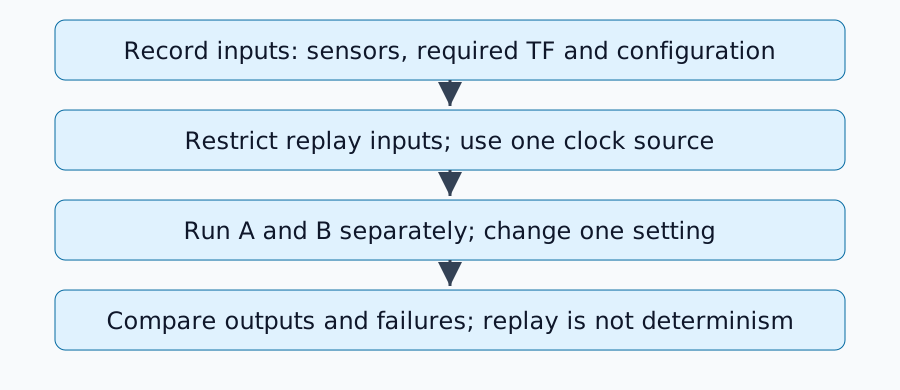
Canlı giriş yayıncılarının durdurulduğu bir analiz ortamında, hedef düğümü ve RViz'i use_sim_time=true ile yapılandırın. Başlatma ayrıntıları pakete bağlıdır, ardından tekrar oynatın:
ros2 bag play replay-input --clock 100 --rate 1.0
Jazzy oynatıcı uygulaması saat seçeneğini tanımlar. Başka bir /clock yayıncısını eş zamanlı olarak çalıştırmayın. --use-sim-time ile kayıt yapmak ve oynatma sırasında bir saat yayınlamak farklı rollere sahiptir.
Bir /tf konusu birden fazla dönüşüm içerebilir. Değerlendirilen düğüm şimdi map→odom üretiyorsa, kaydedilen map→odom'u da tekrar oynatmayın. Gerekli giriş odom→base_link'in tekrar oynatılması gerekebilir. Bu nedenle, konunun tamamını hariç tutmak yetersiz olabilir: kayıt sırasında ayrı çıktı alın veya bireysel dönüşümleri filtreleyin. Çerçeve rolleri için REP-105'e bakın.
Eksik çıktıyı teşhis etme
| Belirti | İlk kontrol |
|---|---|
| Mesajlar pakette mevcut ancak alınmıyor | İsimler, türler ve yayıncı/abone QoS |
| Bulut görünüyor ancak pozisyon atlıyor | Aynı dönüşümün yinelenen yayıncıları |
| TF'nin geçmişe veya geleceğe doğru ekstrapolasyonu | Başlık zamanları, simülasyon zamanı ve kaydedilen TF kapsamı |
| Yalnızca ikinci tekrar farklı | Tahminci durumu, haritalar ve geriye doğru zaman atlamalarının işlenmesi |
QoS, teslimat güvenilirliğini ve geçmişini açıklar. topic info --verbose kullanarak uyumluluğu kontrol edin; her konuyu körü körüne güvenilir hale getirmeyin. Yalnızca gerektiğinde geçersiz kılma YAML'sini uygulayın. Statik TF dayanıklılığındaki değişiklikler, geç abonelere teslimatın kontrol edilmesini de gerektirir.
A/B Çalışma Sayfası Tasarımı
A'yı durdurun, durumu sıfırlayın ve bir ayarı değiştirerek B'yi başlatın. Çantayı, oynatma hızını, başlangıç pozisyonunu, haritayı ve değerlendirilen aralığı sabit tutun. Yörüngeyi, işlem gecikmesini, eksik girdileri ve hata sürelerini kaydedin. Zamanlama veya rastgelelik etkilerini ortaya çıkarmak için değişmeyen koşulları tekrarlayın.
Bu, sabit gözlemlere verilen tepkileri değerlendirir. Farklı bir kontrol komutu gelecekteki gerçek gözlemleri değiştireceğinden, önceden kaydedilmiş sensörlerin tekrar oynatılması kapalı döngü sürüş performansını belirleyemez.
Tamamlama Kriterleri
Gerekli girdiler geldiğinde, her dönüşümün bir yayıncısı olduğunda, zaman tutarlı olduğunda ve yapılandırma farklılıkları test edilen değişikliği açıkladığında karşılaştırma hazırdır. Zamansal hizalama ve yörünge hataları için SLAM değerlendirmesine devam edin.
Yorumlar
Lütfen önce giriş yapın.
Henüz veri yok.