Contents — find the section you need
Change parameters and verify
Open the panel, then press Run to load Python. You can stop execution and reset parameters. Results are computed on this device. No Python installation is required.
Local execution steps below are optional for reproducing the source results; they are not required for the browser experiment.
The experiment controls are in English.
Audit a fixed replay in your browser
Use the panel above to compare clock settings, timestamp offsets, reliability QoS and TF selection. The Lab computes a synthetic replay audit, not ROS, DDS, tf2, a localizer or a robot simulation. It opens no bag files and connects to no robot. The ROS commands below are optional follow-up procedures.
Every run uses eleven scan records at bag times 10.0–12.0 s, spaced 0.2 s apart. Recorded input odom → base_link samples span 9.8–12.2 s at the same spacing. These are invented teaching fixtures, not hardware measurements. The timestamp control adds an offset to scan headers only; bag recording times and TF stamps stay fixed. It represents a differently stamped sensor fixture, not a rosbag2 playback option. Elapsed playback time is (bag time − 10 s) / rate. At 2×, the scan span becomes 1 s while the headers remain in their original time domain.
Read the four checks separately
- Modeled receipt: choose the publisher's offered and subscriber's requested reliability independently. Best-effort offered to reliable requested is incompatible; the other three combinations are compatible. Topic names/types and every other QoS policy are assumed compatible. All compatible scans arrive in this loss-free model. This does not promise real best-effort delivery, establish actual rosbag2 auto-selected QoS, or model queues, deadlines, lifespan, discovery or late subscribers.
- Recorded TF coverage: the scan header must fall within the recorded input TF interval, including endpoints. This is an audit of the complete recording, even when the modeled subscriber receives no scans. It does not simulate tf2's live cache, arrival ordering, interpolation, waiting, or transform availability at a callback. A stamp inside the interval is therefore not proof that a live lookup succeeds.
- Clock difference: the replay-clock fixture sets the node's latest
/clockvalue equal to each scan's bag time, assuming a clock update arrives before each scan. The system-clock fixture starts at the arbitrary value 1000 s and advances by elapsed playback time. Withuse_sim_timebut no received clock, node time is zero and the diagnostic is not evaluated, shown as a dash. For initialized clocks, the Lab counts|node now − scan header| ≤ 150 ms. That symmetric window is a teaching diagnostic, not a ROS validity rule, tf2 tolerance or localizer timeout. It is independent of receipt and TF coverage. - TF publishers: the evaluated localizer is configured to publish
map → odom. “Input transforms only” keeps recordedodom → base_link; “all recorded transforms” adds a secondmap → odompublisher; “exclude all recorded TF” removes the required input edge. Counts describe configured sources, not a computed localization result. Duplicate-source behavior and static-TF durability are not simulated.
Save the default as A and try B with 2× playback, a +400 ms header offset, no clock, a reliability mismatch, or a different TF selection. The plots use common A/B axes. With +400 ms, the last scan is beyond the recorded TF interval; all eleven scans lie outside the teaching clock window. With a missing clock, that window's count is unavailable rather than zero. Neither finding predicts trajectory error. The data table and JSON retain each scan's recording time, header, elapsed time, node time and independent check outcomes.
Reference and scope
The model's rules were reviewed on 2026-09-20 against the rosbag2 Jazzy README, Jazzy player options, Jazzy QoS documentation source, ROS clock design, Jazzy tf2 time tutorial source and REP-105 frame roles. No ROS installation was executed for this Lab.
Each A/B run starts fresh. Scheduling, packet loss, estimator memory, backward time jumps, multiple clock publishers, calibration, static TF, map accuracy and closed-loop driving remain outside this exercise. Use the SLAM evaluation Lab for a separate trajectory-error exercise. Browser checks do not replace the real replay checks below.
Pengulangan simulasi fisik mengubah input dan pengaturan. rosbag2 dapat mempertahankan input yang direkam tetap, tetapi pemutaran ulang tidak mereproduksi seluruh robot secara deterministik. Ini adalah prosedur yang diperiksa terhadap sumber utama ROS 2 Jazzy pada 2026-09-07; prosedur ini belum dijalankan pada perangkat keras ROS atau instalasi ROS yang sedang berjalan.
Tentukan batas perbandingan
Pertimbangkan sebuah localizer yang menggunakan LiDAR dan odometri roda. Rekam /scan, /odom dan /tf dan /tf_static yang diperlukan. Simpan output localizer secara terpisah sebagai hasil perbandingan, bukan kebenaran dasar. Eksperimen kamera juga memerlukan CameraInfo yang sesuai.
README Jazzy mendokumentasikan perekaman, inspeksi, dan penggantian QoS. Simpan versi paket yang terinstal dan output dari ros2 bag record --help dan ros2 bag play --help dengan setiap eksperimen.
Rekam input dan konfigurasi
Nama topik dan node di bawah ini adalah contoh. Temukan milik Anda dengan ros2 topic list dan ros2 node list, lalu rekam saat input aktif:
ros2 topic info /scan --verbose
ros2 bag record -o replay-input --topics /scan /odom /tf /tf_static
Hentikan dengan bersih dengan Ctrl+C, lalu periksa:
ros2 bag info replay-input
ros2 param dump /localizer > localizer-A.yaml
Ganti /localizer dengan node Anda. Simpan juga file peluncuran, peta, URDF, kalibrasi eksternal, komitmen perangkat lunak, dan posisi awal. Jumlah pesan bukan nol tidak membuktikan bahwa setiap input yang diperlukan ada selama interval kegagalan. Periksa offset dan celah stempel waktu per sensor.
Gunakan satu sumber waktu dan satu penerbit per transformasi
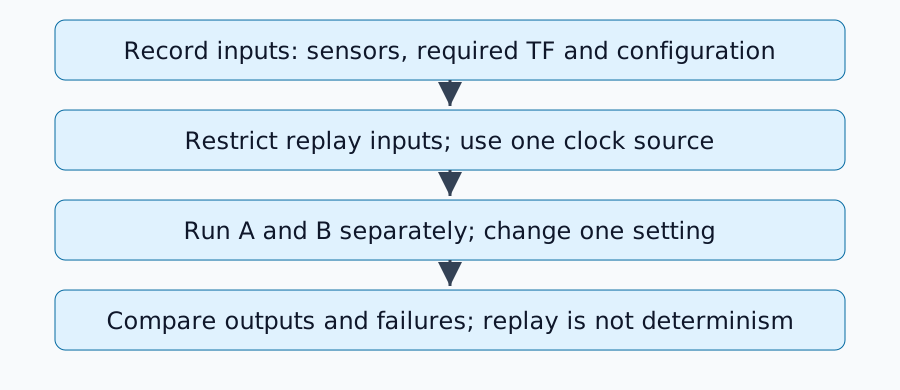
Dalam lingkungan analisis dengan penerbit input langsung yang dihentikan, konfigurasikan node target dan RViz dengan use_sim_time=true. Detail peluncuran bergantung pada paket, lalu putar ulang:
ros2 bag play replay-input --clock 100 --rate 1.0
Implementasi pemutar Jazzy mendefinisikan opsi jam. Jangan jalankan penerbit /clock lain secara bersamaan. Perekaman dengan --use-sim-time dan penerbitan jam selama pemutaran memiliki peran yang berbeda.
Topik /tf dapat berisi beberapa transformasi. Jika node yang dievaluasi sekarang menghasilkan map→odom, jangan juga memutar ulang map→odom yang direkam. Input odom→base_link yang diperlukan mungkin masih perlu diputar ulang. Oleh karena itu, mengecualikan seluruh topik mungkin tidak cukup: pisahkan output pada saat perekaman atau filter transformasi individual. Lihat REP-105 untuk peran frame.
Mendiagnosis output yang hilang
| Gejala | Pemeriksaan pertama |
|---|---|
| Pesan ada di dalam tas tetapi tidak diterima | Nama, tipe, dan QoS penerbit/pelanggan |
| Cloud muncul tetapi terjadi lompatan pose | Penerbit duplikat dari transformasi yang sama |
| Ekstrapolasi TF ke masa lalu atau masa depan | Waktu header, waktu simulasi, dan cakupan TF yang direkam |
| Hanya pemutaran ulang kedua yang berbeda | Status estimator, peta, dan penanganan lompatan waktu mundur |
QoS menjelaskan keandalan dan riwayat pengiriman. Periksa kompatibilitas menggunakan topic info --verbose; jangan secara membabi buta membuat setiap topik dapat diandalkan. Terapkan YAML penggantian hanya jika diperlukan. Perubahan pada daya tahan TF statis juga memerlukan pengecekan pengiriman ke pelanggan yang terlambat.
Merancang lembar uji A/B
Hentikan A, atur ulang status, dan jalankan B dengan satu pengaturan yang diubah. Pertahankan tas, laju pemutaran, posisi awal, peta, dan interval evaluasi tetap. Simpan lintasan, latensi pemrosesan, input yang hilang, dan waktu kegagalan. Ulangi kondisi yang tidak berubah untuk mengungkap efek penjadwalan atau keacakan.
Ini mengevaluasi reaksi terhadap pengamatan tetap. Perintah kontrol yang berbeda akan mengubah pengamatan nyata di masa mendatang, sehingga pemutaran ulang sensor yang telah direkam sebelumnya tidak dapat menetapkan kinerja penggerak loop tertutup.
Kriteria penyelesaian
Perbandingan siap ketika input yang dibutuhkan tiba, setiap transformasi memiliki satu penerbit, waktu konsisten, dan perbedaan konfigurasi menjelaskan perubahan yang diuji. Lanjutkan dengan evaluasi SLAM untuk penyelarasan temporal dan kesalahan lintasan.
Komentar
Silakan masuk terlebih dahulu.
Belum ada data.