Contents — find the section you need
Change parameters and verify
Open the panel, then press Run to load Python. You can stop execution and reset parameters. Results are computed on this device. No Python installation is required.
Local execution steps below are optional for reproducing the source results; they are not required for the browser experiment.
The experiment controls are in English.
Audit a fixed replay in your browser
Use the panel above to compare clock settings, timestamp offsets, reliability QoS and TF selection. The Lab computes a synthetic replay audit, not ROS, DDS, tf2, a localizer or a robot simulation. It opens no bag files and connects to no robot. The ROS commands below are optional follow-up procedures.
Every run uses eleven scan records at bag times 10.0–12.0 s, spaced 0.2 s apart. Recorded input odom → base_link samples span 9.8–12.2 s at the same spacing. These are invented teaching fixtures, not hardware measurements. The timestamp control adds an offset to scan headers only; bag recording times and TF stamps stay fixed. It represents a differently stamped sensor fixture, not a rosbag2 playback option. Elapsed playback time is (bag time − 10 s) / rate. At 2×, the scan span becomes 1 s while the headers remain in their original time domain.
Read the four checks separately
- Modeled receipt: choose the publisher's offered and subscriber's requested reliability independently. Best-effort offered to reliable requested is incompatible; the other three combinations are compatible. Topic names/types and every other QoS policy are assumed compatible. All compatible scans arrive in this loss-free model. This does not promise real best-effort delivery, establish actual rosbag2 auto-selected QoS, or model queues, deadlines, lifespan, discovery or late subscribers.
- Recorded TF coverage: the scan header must fall within the recorded input TF interval, including endpoints. This is an audit of the complete recording, even when the modeled subscriber receives no scans. It does not simulate tf2's live cache, arrival ordering, interpolation, waiting, or transform availability at a callback. A stamp inside the interval is therefore not proof that a live lookup succeeds.
- Clock difference: the replay-clock fixture sets the node's latest
/clockvalue equal to each scan's bag time, assuming a clock update arrives before each scan. The system-clock fixture starts at the arbitrary value 1000 s and advances by elapsed playback time. Withuse_sim_timebut no received clock, node time is zero and the diagnostic is not evaluated, shown as a dash. For initialized clocks, the Lab counts|node now − scan header| ≤ 150 ms. That symmetric window is a teaching diagnostic, not a ROS validity rule, tf2 tolerance or localizer timeout. It is independent of receipt and TF coverage. - TF publishers: the evaluated localizer is configured to publish
map → odom. “Input transforms only” keeps recordedodom → base_link; “all recorded transforms” adds a secondmap → odompublisher; “exclude all recorded TF” removes the required input edge. Counts describe configured sources, not a computed localization result. Duplicate-source behavior and static-TF durability are not simulated.
Save the default as A and try B with 2× playback, a +400 ms header offset, no clock, a reliability mismatch, or a different TF selection. The plots use common A/B axes. With +400 ms, the last scan is beyond the recorded TF interval; all eleven scans lie outside the teaching clock window. With a missing clock, that window's count is unavailable rather than zero. Neither finding predicts trajectory error. The data table and JSON retain each scan's recording time, header, elapsed time, node time and independent check outcomes.
Reference and scope
The model's rules were reviewed on 2026-09-20 against the rosbag2 Jazzy README, Jazzy player options, Jazzy QoS documentation source, ROS clock design, Jazzy tf2 time tutorial source and REP-105 frame roles. No ROS installation was executed for this Lab.
Each A/B run starts fresh. Scheduling, packet loss, estimator memory, backward time jumps, multiple clock publishers, calibration, static TF, map accuracy and closed-loop driving remain outside this exercise. Use the SLAM evaluation Lab for a separate trajectory-error exercise. Browser checks do not replace the real replay checks below.
बार-बार किए जाने वाले भौतिक परीक्षण इनपुट और सेटिंग्स दोनों को बदल देते हैं। rosbag2 रिकॉर्ड किए गए इनपुट को स्थिर रख सकता है, लेकिन रीप्ले पूरे रोबोट को निश्चित रूप से पुन: उत्पन्न नहीं करता है। यह प्रक्रिया 2026-09-07 को ROS 2 Jazzy के प्राथमिक स्रोतों के आधार पर जाँची गई है; इसे ROS हार्डवेयर या चल रहे ROS इंस्टॉलेशन पर निष्पादित नहीं किया गया है।
तुलना सीमा निर्धारित करें
एक लोकलाइज़र पर विचार करें जो LiDAR और व्हील ओडोमेट्री का उपयोग करता है। /scan, /odom और आवश्यक /tf और /tf_static रिकॉर्ड करें। लोकलाइज़र के आउटपुट को ग्राउंड ट्रुथ के बजाय तुलना परिणाम के रूप में अलग से सहेजें। कैमरा प्रयोगों के लिए भी मिलान करने योग्य CameraInfo की आवश्यकता होती है।
Jazzy README में रिकॉर्डिंग, निरीक्षण और QoS ओवरराइड के बारे में जानकारी दी गई है। प्रत्येक प्रयोग के साथ स्थापित पैकेज संस्करणों और ros2 bag record --help और ros2 bag play --help के आउटपुट को सहेजें।
इनपुट और कॉन्फ़िगरेशन रिकॉर्ड करें
नीचे दिए गए विषय और नोड नाम उदाहरण हैं। ros2 topic list और ros2 node list का उपयोग करके अपना विषय और नोड खोजें, फिर इनपुट सक्रिय होने पर रिकॉर्ड करें:
ros2 topic info /scan --verbose
ros2 bag record -o replay-input --topics /scan /odom /tf /tf_static
Ctrl+C दबाकर प्रयोग को सुचारू रूप से रोकें, फिर जांच करें:
ros2 bag info replay-input
ros2 param dump /localizer > localizer-A.yaml
/localizer को अपने नोड से बदलें। लॉन्च फ़ाइलें, मैप, URDF, बाहरी कैलिब्रेशन, सॉफ़्टवेयर कमिट और प्रारंभिक स्थिति को भी सुरक्षित रखें। शून्य से अधिक संदेशों की संख्या यह स्थापित नहीं करती कि विफलता अंतराल के दौरान सभी आवश्यक इनपुट मौजूद थे। प्रत्येक सेंसर के लिए टाइमस्टैम्प ऑफ़सेट और अंतराल की जांच करें।
प्रति ट्रांसफ़ॉर्म एक टाइम सोर्स और एक पब्लिशर का उपयोग करें
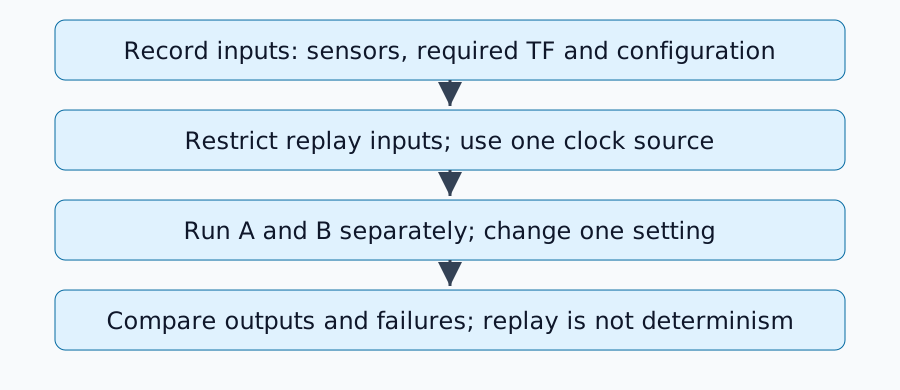
लाइव इनपुट पब्लिशर बंद होने पर, use_sim_time=true का उपयोग करके टारगेट नोड और RViz को कॉन्फ़िगर करें। लॉन्च विवरण पैकेज पर निर्भर करता है, फिर रीप्ले करें:
ros2 bag play replay-input --clock 100 --rate 1.0
जैज़ी प्लेयर इम्प्लीमेंटेशन क्लॉक विकल्प को परिभाषित करता है। एक साथ कोई अन्य /clock पब्लिशर न चलाएँ। --use-sim-time के साथ रिकॉर्डिंग और प्लेबैक के दौरान क्लॉक पब्लिश करने की भूमिकाएँ अलग-अलग होती हैं।
/tf टॉपिक में कई ट्रांसफ़ॉर्म हो सकते हैं। यदि मूल्यांकित नोड अब map→odom जनरेट करता है, तो रिकॉर्ड किए गए map→odom को भी रीप्ले न करें। आवश्यक इनपुट odom→base_link को अभी भी रीप्ले की आवश्यकता हो सकती है। इसलिए, पूरे विषय को बाहर रखना अपर्याप्त हो सकता है: रिकॉर्डिंग के समय अलग आउटपुट या व्यक्तिगत ट्रांसफ़ॉर्म को फ़िल्टर करें। फ़्रेम भूमिकाओं के लिए REP-105 देखें।
अनुपलब्ध आउटपुट का निदान
| लक्षण | पहली जाँच |
|---|---|
| बैग में संदेश मौजूद हैं लेकिन प्राप्त नहीं हो रहे हैं | नाम, प्रकार और प्रकाशक/ग्राहक QoS |
| क्लाउड दिखाई देता है लेकिन पोज़ जंप | एक ही ट्रांसफ़ॉर्म के डुप्लिकेट प्रकाशक |
| अतीत या भविष्य में TF एक्सट्रपलेशन | हेडर समय, सिमुलेशन समय और रिकॉर्ड किया गया TF कवरेज |
| केवल दूसरा रीप्ले भिन्न है | एस्टीमेटर स्थिति, मैप और बैकवर्ड टाइम जंप का प्रबंधन |
QoS डिलीवरी विश्वसनीयता और इतिहास का वर्णन करता है। topic info --verbose का उपयोग करके संगतता की जाँच करें; हर विषय को आँख बंद करके विश्वसनीय न बनाएँ। ओवरराइड YAML केवल वहीं लागू करें जहाँ आवश्यक हो। स्टैटिक-TF स्थायित्व में परिवर्तन के लिए देर से प्राप्त ग्राहकों तक डिलीवरी की जाँच करना भी आवश्यक है।
ए/बी रन शीट डिज़ाइन करें
ए को रोकें, स्थिति रीसेट करें और एक परिवर्तित सेटिंग के साथ बी को लॉन्च करें। बैग, प्लेबैक दर, प्रारंभिक स्थिति, मानचित्र और मूल्यांकित अंतराल को स्थिर रखें। प्रक्षेप पथ, प्रसंस्करण विलंबता, छूटे हुए इनपुट और विफलता समय को सहेजें। शेड्यूलिंग या यादृच्छिकता प्रभावों को उजागर करने के लिए अपरिवर्तित स्थितियों को दोहराएं।
यह स्थिर प्रेक्षणों पर प्रतिक्रियाओं का मूल्यांकन करता है। एक अलग नियंत्रण कमांड भविष्य के वास्तविक प्रेक्षणों को बदल देगा, इसलिए पूर्व-रिकॉर्ड किए गए सेंसरों को पुनः चलाने से क्लोज्ड-लूप ड्राइविंग प्रदर्शन स्थापित नहीं किया जा सकता है।
पूर्णता मानदंड
तुलना तब तैयार होती है जब आवश्यक इनपुट प्राप्त हो जाते हैं, प्रत्येक रूपांतरण का एक प्रकाशक होता है, समय सुसंगत होता है और विन्यास अंतर परीक्षण किए गए परिवर्तन की व्याख्या करते हैं। अस्थायी संरेखण और प्रक्षेप पथ त्रुटियों के लिए SLAM मूल्यांकन के साथ आगे बढ़ें।
टिप्पणियाँ
पहले लॉग इन करें।
अभी कोई डेटा नहीं है।