Contents — find the section you need
Recreating a container does not automatically restore its data. Identify storage boundaries and exactly what an operation removes. This is a documentation-based exercise, checked on 2026-09-07; no production containers or volumes were used for testing.
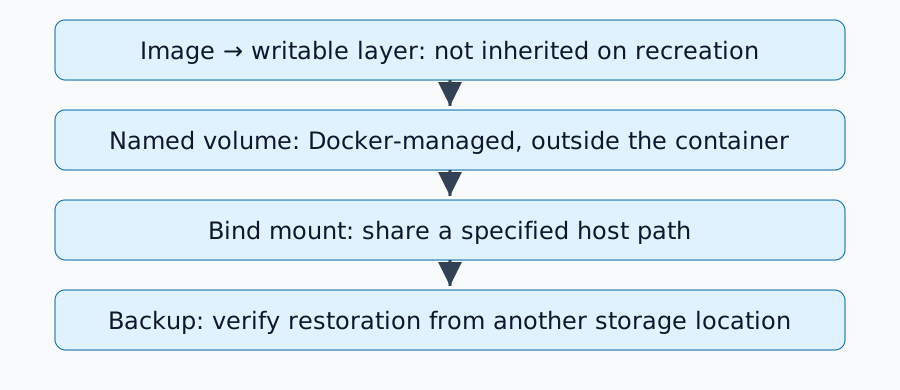
Three storage locations
| Location | Ownership boundary | After container removal |
|---|---|---|
| Writable layer | Individual container | Changes in that layer are lost |
| Named volume | Independent Docker-managed storage | Remains unless the volume is removed |
| Bind mount | Specified Docker-host path | Remains as host files |
Stopping/restarting differs from removing/recreating. Volume documentation explains lifecycle. Anonymous volumes have different cleanup rules, including behavior with --rm; this exercise uses a named volume.
Create a disposable named-volume exercise
The example assumes Docker Engine, Linux containers and alpine:3.21. Record Docker version and the actual downloaded image digest; tags can change. Check with docker volume ls that duskcoil-lifetime-demo is unused before proceeding:
docker volume create duskcoil-lifetime-demo
docker run --rm --mount type=volume,source=duskcoil-lifetime-demo,target=/data alpine:3.21 sh -c 'echo saved > /data/note.txt; echo temporary > /tmp/note.txt'
docker run --rm --mount type=volume,source=duskcoil-lifetime-demo,target=/data,readonly alpine:3.21 sh -c 'cat /data/note.txt; test ! -e /tmp/note.txt'
Expected: the second container reads saved from /data/note.txt, while its /tmp/note.txt is absent. Removing the first container leaves the named volume intact. The second mount is read-only. Do not substitute production service names or data into this exercise.
Which host does a bind mount use?
Bind mounts refer to paths on the Docker daemon's host. A remote daemon may not see your local PC's files. Docker Desktop also introduces a VM boundary.
Inspect Mounts in docker inspect <container> for Type, Source, Destination and RW. Resolve an incorrect /data mount before changing application settings. A mount can obscure existing files underneath it; distinguish missing data from data hidden by another mounted directory.
Read Compose cleanup semantics
docker compose down differs from docker compose down --volumes. The latter also targets named volumes declared in Compose; external volumes are managed separately. Check the down reference.
Changing a Compose project name can select a newly named volume and make the application appear empty. Inspect actual names before assuming corruption. Remove the exercise volume only by its specific name after confirming it is no longer needed; broad volume cleanup is not part of this procedure.
Persistence is not backup
A volume separates data from container lifecycle, but does not necessarily protect against disk failure or application deletion. Keep a separate copy and test restoration. Copying live database files may be inconsistent: use application-supported backup procedures or appropriate shutdown/snapshot conditions.
Images and Compose files alone may omit user uploads and databases. A database alone may omit required configuration, keys or compatible versions. Confirm that the restored application can actually read its data.
Build a storage inventory
For each service record the in-container path, actual mount, ownership/permissions, backup method, restore destination and last restore-test date. Then continue with the home-server restore exercise to check that essential data is covered.
Comments
Please log in to post a comment
No comments yet.