Contents — find the section you need
Change parameters and verify
Open the panel, then press Run to load Python. You can stop execution and reset parameters. Results are computed on this device. No Python installation is required.
Local execution steps below are optional for reproducing the source results; they are not required for the browser experiment.
The experiment controls are in English.
Explore storage boundaries in the browser
The panel models storage ownership and container connections. It does not run Docker or access your files. Choose a storage location and operation, then compare the stage diagram and evidence table. Local Docker commands below are optional follow-up work.
Each run starts from the same prepared fixture: /data/note.txt contains saved in the selected store, and /tmp/note.txt contains temporary in the container's writable layer. The image has no initial files at /data; application startup creates no files. The selected mount's read-only setting is applied after preparation. At the end, the model attempts to write a different file, /data/probe.txt. That marker never recreates the original note.
The named volume uses the default project-scoped name alpha_data. The external volume is pre-existing shared_data; the bind mount always uses the same absolute daemon-host path /srv/demo-data. Both fixed sources remain the same when changing projects. No custom volume name, anonymous volumes, tmpfs, driver options, image-to-volume population, permissions beyond the read-only mount, or other containers are modeled.
“Switch project” means alpha is taken down without deleting volumes, then beta is started. “Switch back” repeats that operation to return to alpha. A new empty beta_data can hide access to the original note without deleting alpha_data. The diagram distinguishes retained data from a readable connection. The read-only control applies only to mounts and has no effect in the writable-layer case.
Try these comparisons: restart versus recreate for the writable layer; ordinary down versus down --volumes for a managed named volume; project switching versus switching back; and managed versus external volumes during cleanup. Each removal scenario includes starting the service again. Metrics are binary outcomes (1 = yes, 0 = no), not probabilities, timings, or recovery guarantees.
Rules were checked against Docker storage, volume lifecycle, bind mounts, Compose down and Compose volume names/external volumes on 2026-09-20. This is a documentation-based state model, not a live Engine conformance test. It models neither host failure nor application/database consistency. Continue to the restore Lab to examine separate recovery checks.
कंटेनर को पुनः बनाने से उसका डेटा स्वतः पुनर्स्थापित नहीं होता। संग्रहण सीमाओं की पहचान करें और यह जानें कि किसी ऑपरेशन से वास्तव में क्या हटाया जाता है। यह दस्तावेज़-आधारित अभ्यास है, जिसकी जाँच 2026-09-07 को की गई थी; परीक्षण के लिए किसी भी उत्पादन कंटेनर या वॉल्यूम का उपयोग नहीं किया गया था।
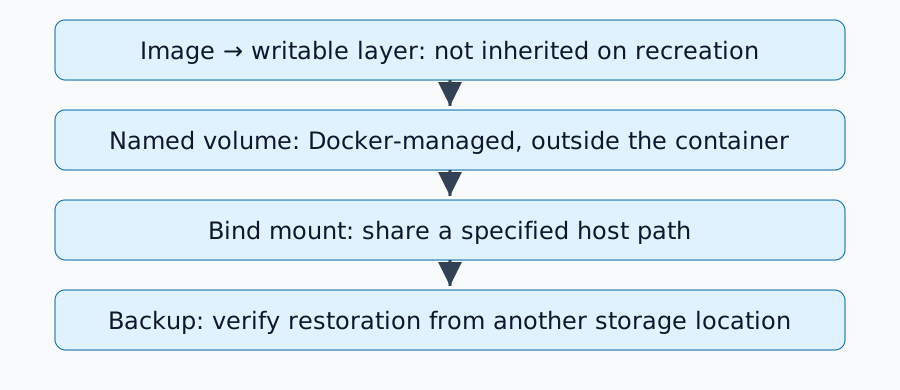
तीन संग्रहण स्थान
| स्थान | स्वामित्व सीमा | कंटेनर हटाने के बाद |
|---|---|---|
| लेखन योग्य परत | व्यक्तिगत कंटेनर | उस परत में किए गए परिवर्तन नष्ट हो जाते हैं |
नामित वॉल्यूम | स्वतंत्र डॉकर-प्रबंधित संग्रहण | वॉल्यूम हटाए जाने तक बना रहता है |
बाइंड माउंट | निर्दिष्ट डॉकर-होस्ट पथ | होस्ट फ़ाइलों के रूप में बना रहता है |
रोकना/पुनः आरंभ करना, हटाने/पुनः बनाने से भिन्न है। वॉल्यूम दस्तावेज़ीकरण जीवनचक्र की व्याख्या करता है। अनाम वॉल्यूम के लिए अलग-अलग सफाई नियम हैं, जिनमें --rm के साथ व्यवहार भी शामिल है; इस अभ्यास में एक नामित वॉल्यूम का उपयोग किया गया है।
डिस्पोजेबल नाम-वॉल्यूम बनाने का अभ्यास
यह उदाहरण डॉकर इंजन, लिनक्स कंटेनर और alpine:3.21 को मानता है। डॉकर संस्करण और डाउनलोड की गई वास्तविक छवि डाइजेस्ट को रिकॉर्ड करें; टैग बदल सकते हैं। आगे बढ़ने से पहले docker volume ls से जांच लें कि duskcoil-lifetime-demo का उपयोग नहीं किया जा रहा है:
docker volume create duskcoil-lifetime-demo
docker run --rm --mount type=volume,source=duskcoil-lifetime-demo,target=/data alpine:3.21 sh -c 'echo saved > /data/note.txt; echo temporary > /tmp/note.txt'
docker run --rm --mount type=volume,source=duskcoil-lifetime-demo,target=/data,readonly alpine:3.21 sh -c 'cat /data/note.txt; test ! -e /tmp/note.txt'
अपेक्षित: दूसरा कंटेनर /data/note.txt से सहेजे गए डेटा को पढ़ता है, जबकि उसका /tmp/note.txt अनुपस्थित है। पहले कंटेनर को हटाने से नाम-वॉल्यूम बरकरार रहता है। दूसरा माउंट केवल पढ़ने योग्य है। इस अभ्यास में उत्पादन सेवा नामों या डेटा को प्रतिस्थापित न करें।
बाइंड माउंट किस होस्ट का उपयोग करता है?
बाइंड माउंट डॉकर डेमन के होस्ट पर पथों को संदर्भित करते हैं। एक रिमोट डेमन आपके स्थानीय पीसी की फ़ाइलों को नहीं देख सकता है। डॉकर डेस्कटॉप एक VM सीमा भी स्थापित करता है।
docker inspect <container> में माउंट्स की जाँच करें, जिनमें टाइप, सोर्स, डेस्टिनेशन और RW शामिल हैं। एप्लिकेशन सेटिंग्स बदलने से पहले गलत /data माउंट को ठीक करें। एक माउंट उसके नीचे मौजूद फ़ाइलों को छिपा सकता है; गुम डेटा और किसी अन्य माउंटेड डायरेक्टरी द्वारा छिपे डेटा के बीच अंतर करें।
कंपोज़ क्लीनअप सिमेंटिक्स पढ़ें
docker compose down, docker compose down --volumes से भिन्न है। बाद वाला कंपोज़ में घोषित नामित वॉल्यूम को भी लक्षित करता है; बाहरी वॉल्यूम को अलग से प्रबंधित किया जाता है। डाउन रेफरेंस देखें।
कंपोज़ प्रोजेक्ट का नाम बदलने से एक नया नामित वॉल्यूम चुना जा सकता है और एप्लिकेशन खाली दिखाई दे सकता है। भ्रष्टाचार की आशंका से पहले वास्तविक नामों की जाँच करें। अभ्यास वॉल्यूम को केवल उसके विशिष्ट नाम से हटाएँ, यह पुष्टि करने के बाद कि अब इसकी आवश्यकता नहीं है; व्यापक वॉल्यूम क्लीनअप इस प्रक्रिया का हिस्सा नहीं है।
डेटा को स्थायी रूप से सहेजना बैकअप नहीं है
वॉल्यूम डेटा को कंटेनर के जीवनचक्र से अलग करता है, लेकिन यह डिस्क विफलता या एप्लिकेशन डिलीट होने से सुरक्षा प्रदान नहीं करता है। एक अलग कॉपी रखें और पुनर्स्थापना का परीक्षण करें। लाइव डेटाबेस फ़ाइलों की कॉपी करना असंगत हो सकता है: एप्लिकेशन द्वारा समर्थित बैकअप प्रक्रियाओं या उपयुक्त शटडाउन/स्नैपशॉट स्थितियों का उपयोग करें।
केवल इमेज और कंपोज़ फ़ाइलें उपयोगकर्ता द्वारा अपलोड किए गए डेटा और डेटाबेस को छोड़ सकती हैं। केवल डेटाबेस आवश्यक कॉन्फ़िगरेशन, कुंजियाँ या संगत संस्करणों को छोड़ सकता है। पुष्टि करें कि पुनर्स्थापित एप्लिकेशन वास्तव में अपना डेटा पढ़ सकता है।
स्टोरेज इन्वेंटरी बनाएँ
प्रत्येक सेवा के लिए कंटेनर पथ, वास्तविक माउंट, स्वामित्व/अनुमतियाँ, बैकअप विधि, पुनर्स्थापना गंतव्य और अंतिम पुनर्स्थापना परीक्षण तिथि रिकॉर्ड करें। फिर आवश्यक डेटा की सुरक्षा सुनिश्चित करने के लिए होम-सर्वर पुनर्स्थापना अभ्यास जारी रखें।
टिप्पणियाँ
पहले लॉग इन करें।
अभी कोई डेटा नहीं है।